Agents > Inference & providers
Bring Your Own API Key
# Bring Your Own API Key Warp supports **Bring Your Own API Key (BYOK)** for users who want to connect agents to their own Anthropic, OpenAI, or Google API accounts. This lets you use your own API keys for model access, giving you control over model selection, billing, and data routing. See [Model Choice](/agents/inference/model-choice/) for a list of supported models. You can also connect a [ChatGPT subscription](/agents/inference/chatgpt-subscription/) for eligible OpenAI models or a [SuperGrok subscription](/agents/inference/grok-subscription/) for Grok models. Your provider bills inference routed through your keys. Applicable [platform charges](/support-and-community/plans-and-billing/platform-credits/) remain. <VideoEmbed url="https://youtu.be/jbSBnbPzQwY" title="How to BYOK to the Warp Agent" /> :::note BYOK is available on Free and all eligible paid plans for individual users and organizations with 10 or fewer employees, subject to Warp's [Terms of Service](https://www.warp.dev/legal/terms-of-service). Larger organizations need a Business or Enterprise plan. See [Warp pricing](https://www.warp.dev/pricing) for current availability. ::: ## How BYOK differs from custom inference endpoints and BYOLLM Warp offers several ways to bring your own AI infrastructure. Use this table to pick the right one, and follow the links for full details. | Name | Meaning | Plans | | --- | --- | --- | | **Personal BYOK** | Use your own API key for OpenAI, Anthropic, or Google models in local Warp Agent runs. Keys are stored on your device. | Free and all eligible paid plans | | **[Personal custom inference endpoint](/agents/inference/custom-inference-endpoint/)** | Connect local Warp Agent runs to an OpenAI-compatible endpoint such as OpenRouter, LiteLLM, z.ai, or an internal gateway. | Free and all eligible paid plans | | **[Team-managed API keys and endpoints](/enterprise/enterprise-features/team-managed-keys-and-endpoints/)** | An admin configures shared provider keys or endpoints for local and cloud Warp Agent runs. | Business and Enterprise | | **[Bring Your Own LLM](/enterprise/enterprise-features/bring-your-own-llm/)** (BYOLLM) | Route inference through your organization's AWS Bedrock or Gemini Enterprise (Vertex AI) account. See the provider guides for cloud support. | Enterprise only | | **[SuperGrok subscription](/agents/inference/grok-subscription/)** | Connect your SuperGrok subscription to use Grok models through your xAI account. Tokens are stored locally on your device. | Free and all eligible paid plans | | **[ChatGPT subscription](/agents/inference/chatgpt-subscription/)** | Connect your ChatGPT plan to use eligible OpenAI models with the Warp Agent in the Warp app. | See [Warp pricing](https://www.warp.dev/pricing) | See [Warp pricing](https://www.warp.dev/pricing) for current plan availability. Cloud runs incur platform charges for billable agent time. Local runs on Business and Enterprise that use customer-supplied inference also incur platform charges. See [platform usage](/support-and-community/plans-and-billing/platform-credits/) for rates and contract-specific terms. You can't connect a Claude consumer subscription to the Warp Agent. To use your own Anthropic account, configure BYOK; Anthropic bills API usage separately from a subscription. ## How BYOK works Personal API keys are stored in your device's secure storage. When you select a provider model with a key icon, your prompt, context, and key pass through Warp's servers to that provider. Warp does not retain your personal API key. :::caution Personal BYOK keys work for local Warp Agent runs, not [cloud runs](/platform/). Business and Enterprise teams can configure [team-managed API keys and endpoints](/enterprise/enterprise-features/team-managed-keys-and-endpoints/), which Warp stores securely for local and cloud inference. ::: ## Enabling BYOK To configure personal API keys in the Warp app: 1. Open **Settings** and search for `API keys` to find the BYOK configuration. 2. Add your API key(s) for Anthropic, OpenAI, or Google. 3. Once added, you'll see a **key icon** next to supported models in the model picker. For [CLI runs](/agents/cli/models-and-usage/#bring-your-own-api-key), configure provider keys separately from the Warp app.  When you select a model with a key icon, Warp routes inference through your own API key instead of consuming Warp-provided inference usage. ## BYOK usage and billing behavior ### Auto Model Warp's **Auto** models use Warp-provided inference and consume your available usage, even if you've configured your own API keys. To use your own key, select a specific provider model (for example, Claude Opus 4.7, Claude Sonnet 4.6, GPT-5.5, or Gemini 3.1 Pro) directly from the model picker with a key icon. [Custom routers](/agents/inference/custom-routers/) resolve each task to a model you chose, then apply your API keys to that model. Requests covered by one of your keys bill inference through your provider account. See [usage and model availability](/agents/inference/custom-routers/#credits-and-model-availability) for details. <span id="credit-usage" /> ### Inference usage When you select a model with the key icon in your model picker, Warp routes the request through your API key. In that case: * Inference is billed through your provider account rather than your Warp usage balance. * Agent Mode prioritizes BYOK over Warp-provided inference. **Other AI features in Warp** Personal BYOK doesn't change the inference configuration of these features: | Feature | Uses Warp-provided usage | Description | | ----------------------------------------------------------------------------- | ------------------- | -------------------------------------------------------------------- | | [Active AI Recommendations](/agents/local-agents/active-ai/) | No | Always included with Build and higher plans. | | [Codebase Context](/agents/capabilities/codebase-context/) | Yes | Uses Warp-provided inference. | | [Cloud Agents](/platform/) | Yes | Personal keys aren't available. Business and Enterprise teams can use [team-managed inference](/enterprise/enterprise-features/team-managed-keys-and-endpoints/); applicable platform and Warp-hosted compute charges remain. | ### Failover and fallback behavior If Warp detects an issue with your API key, you’ll see a clear error message corresponding with the AI request. If your key: * Is invalid: Warp notifies you and halts the request. * Hits usage or rate limits: Warp will not retry using Warp-provided inference unless fallback is enabled. You can update or replace your keys anytime by opening **Settings** and searching for `API keys`. **Warp credit fallback** is off by default. Enable it to retry a failed BYOK request with Warp-provided inference. Fallback requests consume your available Warp usage.  ### Zero Data Retention (ZDR) and BYOK Warp is **SOC 2 compliant** and has **Zero Data Retention (ZDR)** policies with all of its contracted LLM providers. No customer AI data is retained, stored, or used for training by the model providers. BYOK prompts and responses transit Warp's backend (see [How BYOK works](#how-byok-works)). Warp does not use this content for training; retention and analytics handling follow the same account-level privacy and telemetry settings that apply to Warp-billed traffic. However, when you use your own API key: * Data retention policies on the **provider side** depend on your provider’s account settings. * Warp cannot enforce ZDR for requests sent through your API keys. * If your Anthropic, OpenAI, or Google account does not have ZDR enabled, your requests may be retained by the provider according to their terms. ### BYOK on Business and Enterprise plans Personal BYOK is configured on each member's device, including on Business and Enterprise. Those keys work for local Warp Agent runs in the app or CLI, not [cloud agents](/platform/). For shared keys that work in local and cloud runs, configure [team-managed API keys and endpoints](/enterprise/enterprise-features/team-managed-keys-and-endpoints/) in the [Admin Panel](/enterprise/team-management/admin-panel/). <span id="related-resources" /> ## Related pages * **[Custom inference endpoint](/agents/inference/custom-inference-endpoint/)** - Route Warp through any OpenAI-compatible endpoint, such as OpenRouter, LiteLLM, z.ai, or an internal gateway. * **[Bring Your Own LLM](/enterprise/enterprise-features/bring-your-own-llm/)** - Enterprise-managed inference through your cloud provider or approved infrastructure. * **[SuperGrok subscription](/agents/inference/grok-subscription/)** - Use Grok models through your xAI account. * **[ChatGPT subscription](/agents/inference/chatgpt-subscription/)** - Use eligible OpenAI models in Warp Agent conversations in the Warp app through your ChatGPT plan. * **[Model choice](/agents/inference/model-choice/)** - Full list of supported models and `model_id` values. * **[Usage and billing](/support-and-community/plans-and-billing/credits/)** - Inference, compute, and platform charges.Tell me about this feature: https://docs.warp.dev/agents/inference/bring-your-own-api-key/Warp lets you bring your own API keys (BYOK) for OpenAI, Anthropic, and Google AI models.
Warp supports Bring Your Own API Key (BYOK) for users who want to connect agents to their own Anthropic, OpenAI, or Google API accounts.
This lets you use your own API keys for model access, giving you control over model selection, billing, and data routing. See Model Choice for a list of supported models. You can also connect a ChatGPT subscription for eligible OpenAI models or a SuperGrok subscription for Grok models.
Your provider bills inference routed through your keys. Applicable platform charges remain.
How BYOK differs from custom inference endpoints and BYOLLM
Section titled “How BYOK differs from custom inference endpoints and BYOLLM”Warp offers several ways to bring your own AI infrastructure. Use this table to pick the right one, and follow the links for full details.
| Name | Meaning | Plans |
|---|---|---|
| Personal BYOK | Use your own API key for OpenAI, Anthropic, or Google models in local Warp Agent runs. Keys are stored on your device. | Free and all eligible paid plans |
| Personal custom inference endpoint | Connect local Warp Agent runs to an OpenAI-compatible endpoint such as OpenRouter, LiteLLM, z.ai, or an internal gateway. | Free and all eligible paid plans |
| Team-managed API keys and endpoints | An admin configures shared provider keys or endpoints for local and cloud Warp Agent runs. | Business and Enterprise |
| Bring Your Own LLM (BYOLLM) | Route inference through your organization’s AWS Bedrock or Gemini Enterprise (Vertex AI) account. See the provider guides for cloud support. | Enterprise only |
| SuperGrok subscription | Connect your SuperGrok subscription to use Grok models through your xAI account. Tokens are stored locally on your device. | Free and all eligible paid plans |
| ChatGPT subscription | Connect your ChatGPT plan to use eligible OpenAI models with the Warp Agent in the Warp app. | See Warp pricing |
See Warp pricing for current plan availability.
Cloud runs incur platform charges for billable agent time. Local runs on Business and Enterprise that use customer-supplied inference also incur platform charges. See platform usage for rates and contract-specific terms.
You can’t connect a Claude consumer subscription to the Warp Agent. To use your own Anthropic account, configure BYOK; Anthropic bills API usage separately from a subscription.
How BYOK works
Section titled “How BYOK works”Personal API keys are stored in your device’s secure storage. When you select a provider model with a key icon, your prompt, context, and key pass through Warp’s servers to that provider. Warp does not retain your personal API key.
Enabling BYOK
Section titled “Enabling BYOK”To configure personal API keys in the Warp app:
- Open Settings and search for
API keysto find the BYOK configuration. - Add your API key(s) for Anthropic, OpenAI, or Google.
- Once added, you’ll see a key icon next to supported models in the model picker.
For CLI runs, configure provider keys separately from the Warp app.
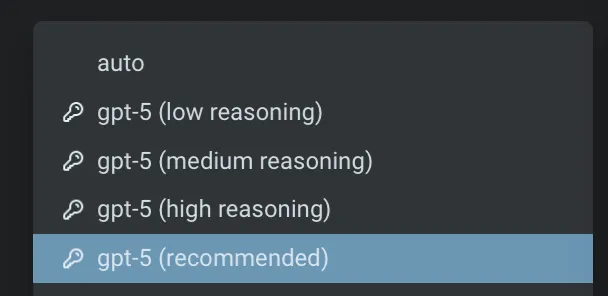
When you select a model with a key icon, Warp routes inference through your own API key instead of consuming Warp-provided inference usage.
BYOK usage and billing behavior
Section titled “BYOK usage and billing behavior”Auto Model
Section titled “Auto Model”Warp’s Auto models use Warp-provided inference and consume your available usage, even if you’ve configured your own API keys.
To use your own key, select a specific provider model (for example, Claude Opus 4.7, Claude Sonnet 4.6, GPT-5.5, or Gemini 3.1 Pro) directly from the model picker with a key icon.
Custom routers resolve each task to a model you chose, then apply your API keys to that model. Requests covered by one of your keys bill inference through your provider account. See usage and model availability for details.
Inference usage
Section titled “Inference usage”When you select a model with the key icon in your model picker, Warp routes the request through your API key. In that case:
- Inference is billed through your provider account rather than your Warp usage balance.
- Agent Mode prioritizes BYOK over Warp-provided inference.
Other AI features in Warp
Personal BYOK doesn’t change the inference configuration of these features:
| Feature | Uses Warp-provided usage | Description |
|---|---|---|
| Active AI Recommendations | No | Always included with Build and higher plans. |
| Codebase Context | Yes | Uses Warp-provided inference. |
| Cloud Agents | Yes | Personal keys aren’t available. Business and Enterprise teams can use team-managed inference; applicable platform and Warp-hosted compute charges remain. |
Failover and fallback behavior
Section titled “Failover and fallback behavior”If Warp detects an issue with your API key, you’ll see a clear error message corresponding with the AI request.
If your key:
- Is invalid: Warp notifies you and halts the request.
- Hits usage or rate limits: Warp will not retry using Warp-provided inference unless fallback is enabled.
You can update or replace your keys anytime by opening Settings and searching for API keys.
Warp credit fallback is off by default. Enable it to retry a failed BYOK request with Warp-provided inference. Fallback requests consume your available Warp usage.

Zero Data Retention (ZDR) and BYOK
Section titled “Zero Data Retention (ZDR) and BYOK”Warp is SOC 2 compliant and has Zero Data Retention (ZDR) policies with all of its contracted LLM providers. No customer AI data is retained, stored, or used for training by the model providers.
BYOK prompts and responses transit Warp’s backend (see How BYOK works). Warp does not use this content for training; retention and analytics handling follow the same account-level privacy and telemetry settings that apply to Warp-billed traffic.
However, when you use your own API key:
- Data retention policies on the provider side depend on your provider’s account settings.
- Warp cannot enforce ZDR for requests sent through your API keys.
- If your Anthropic, OpenAI, or Google account does not have ZDR enabled, your requests may be retained by the provider according to their terms.
BYOK on Business and Enterprise plans
Section titled “BYOK on Business and Enterprise plans”Personal BYOK is configured on each member’s device, including on Business and Enterprise. Those keys work for local Warp Agent runs in the app or CLI, not cloud agents.
For shared keys that work in local and cloud runs, configure team-managed API keys and endpoints in the Admin Panel.
Related pages
Section titled “Related pages”- Custom inference endpoint - Route Warp through any OpenAI-compatible endpoint, such as OpenRouter, LiteLLM, z.ai, or an internal gateway.
- Bring Your Own LLM - Enterprise-managed inference through your cloud provider or approved infrastructure.
- SuperGrok subscription - Use Grok models through your xAI account.
- ChatGPT subscription - Use eligible OpenAI models in Warp Agent conversations in the Warp app through your ChatGPT plan.
- Model choice - Full list of supported models and
model_idvalues. - Usage and billing - Inference, compute, and platform charges.