Agents > Interacting with agents
Agent code diffs and review
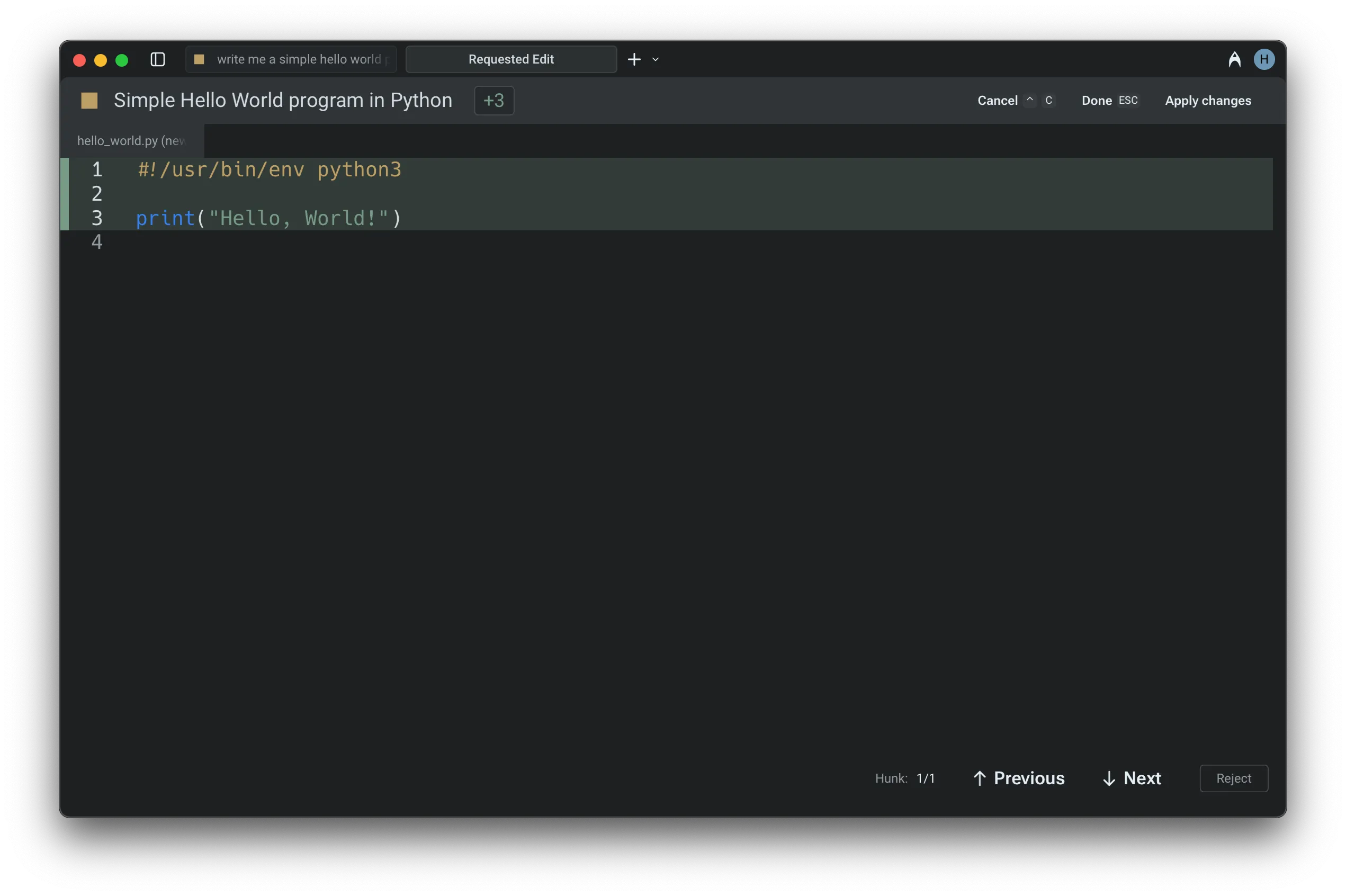
# Agent code diffs and review When the Warp Agent generates code changes, they appear as visual diffs in a built-in editor. Review proposed changes line by line, refine them with natural language, make manual edits, or accept them to apply the modifications to your files. ## Reviewing code diffs During an Agent Conversation, Warp can generate code diffs that open directly in a built-in diff editor. This lets you review proposed changes line by line, refine them with natural language, or make manual edits before choosing whether to apply them. It’s a fast, transparent way to stay in control of agent-generated code. :::caution If the `Apply Code Diffs` permission is set to `Always allow` in [Agent Profiles & Permissions](/agents/capabilities/agent-profiles-permissions/), code diffs are applied automatically without being surfaced for review. If it's set to `Agent decides` or `Always ask`, you'll always be prompted to review diffs before they're applied. ::: :::note Code diffs generated by Warp are never stored on our servers. Warp's coding agent only works on local repositories. The agent can make changes on remote or Docker repositories, but falls back to using terminal commands (i.e. `sed`, `grep` ) to make the changes. ::: <figure>  <figcaption>A code diff surfaced in an Agent Conversation.</figcaption> </figure> You can also choose whether Warp automatically opens the [Code Review](/code/code-review/) panel the first time you accept a diff in a conversation. ## Navigating and applying diffs When an Agent generates a code diff, Warp opens it in a built-in text editor with a visual diff view. Changes are grouped into clear hunks for easy inspection. * Use the `↑` and `↓` arrow keys (or mouse clicks) to move between hunks. * For multi-file changes, use `←` and `→` arrow keys to switch between files. * Once satisfied with the changes, you can apply the diffs using `Enter` or clicking "**Accept Changes**" to apply the modifications. :::caution These modifications will not be applied to the files unless you explicitly accept them. ::: ## Refining or editing the diffs If the initial suggestion needs more work: * Press `R` or select the "**Refine**" button to provide follow-up instructions in natural language. The agent will regenerate the diff based on your input. * To manually adjust the code, press `E` or click "**Edit**" to switch into an editable view. * To cancel a pending operation, use `Ctrl+C` (on macOS, Windows, or Linux). Similarly, you can exit the editor at any time with `Esc`. :::note You can open up code files in Warp in various different ways, refer to: [Opening files in Warp](/code/code-editor/#opening-files-in-warp) ::: <figure>  <figcaption>Editing a code diff in Warp's code editor.</figcaption> </figure> ## Accepting diffs and continuing in Agent Mode When the Agent generates a code diff outside of an active conversation — for example, from a suggested code banner or a passive recommendation — you can accept the diff and seamlessly continue in Agent Mode. After accepting, Warp opens (or returns to) the Agent conversation with the applied changes as context, so you can immediately ask follow-up questions or request further modifications without starting a new conversation. ### Demo: Editing Agent Code in Warp Here's an example from [Warp Guides](/guides/), where Zach demonstrates how to review and edit Agent code diffs natively in Warp: <VideoEmbed url="https://www.youtube.com/watch?time_continue=111&v=dm-P63USsVg" title="Reviewing agent code diffs in Warp video" />Tell me about this feature: https://docs.warp.dev/agents/local-agents/code-diffs/How to review, refine, and apply code changes generated by Warp’s Agents with the built-in diff editor in Agent Conversations.
When the Warp Agent generates code changes, they appear as visual diffs in a built-in editor. Review proposed changes line by line, refine them with natural language, make manual edits, or accept them to apply the modifications to your files.
Reviewing code diffs
Section titled “Reviewing code diffs”During an Agent Conversation, Warp can generate code diffs that open directly in a built-in diff editor.
This lets you review proposed changes line by line, refine them with natural language, or make manual edits before choosing whether to apply them. It’s a fast, transparent way to stay in control of agent-generated code.
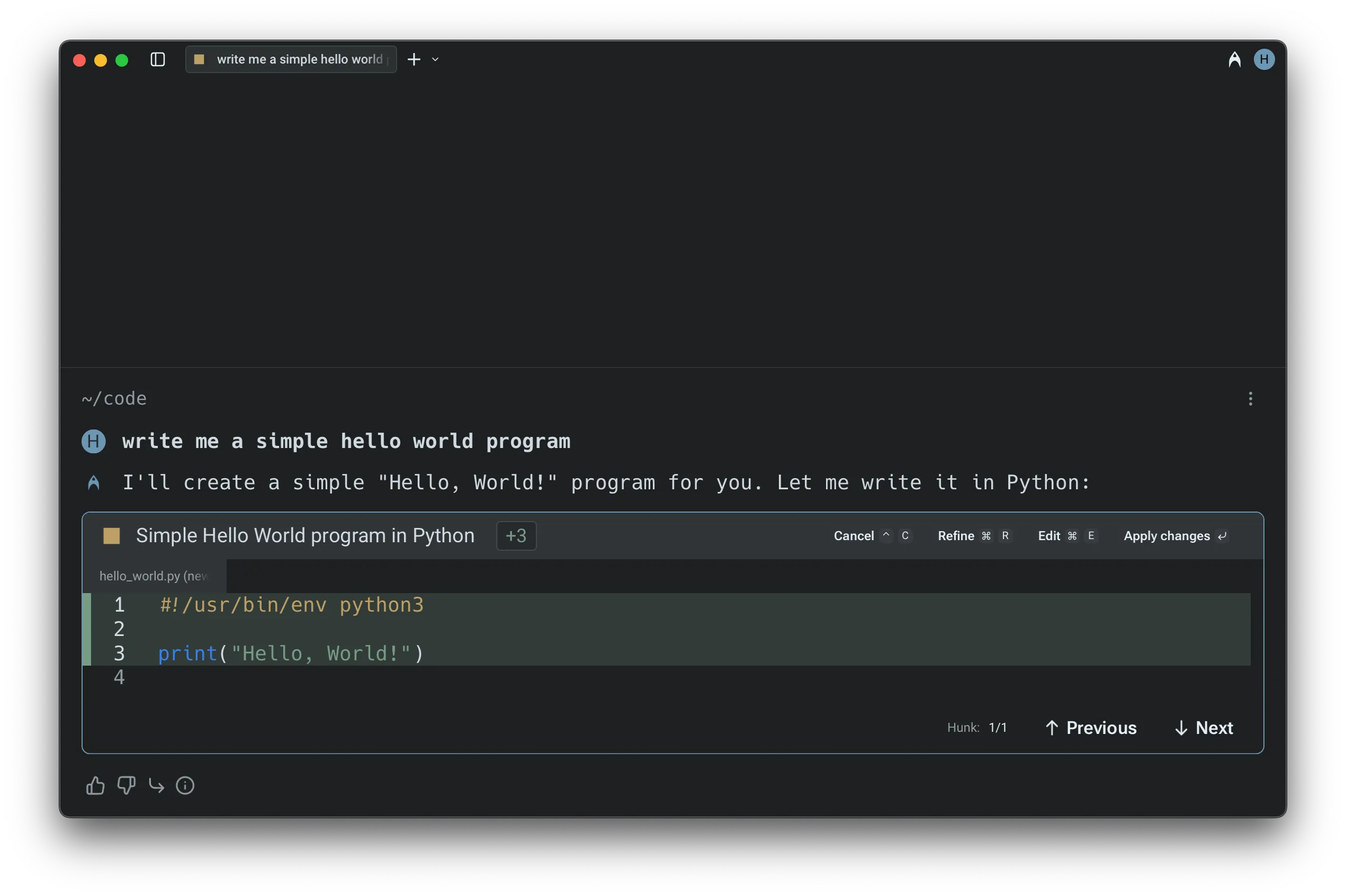
You can also choose whether Warp automatically opens the Code Review panel the first time you accept a diff in a conversation.
Navigating and applying diffs
Section titled “Navigating and applying diffs”When an Agent generates a code diff, Warp opens it in a built-in text editor with a visual diff view. Changes are grouped into clear hunks for easy inspection.
- Use the
↑and↓arrow keys (or mouse clicks) to move between hunks. - For multi-file changes, use
←and→arrow keys to switch between files. - Once satisfied with the changes, you can apply the diffs using
Enteror clicking “Accept Changes” to apply the modifications.
Refining or editing the diffs
Section titled “Refining or editing the diffs”If the initial suggestion needs more work:
- Press
Ror select the “Refine” button to provide follow-up instructions in natural language. The agent will regenerate the diff based on your input. - To manually adjust the code, press
Eor click “Edit” to switch into an editable view. - To cancel a pending operation, use
Ctrl+C(on macOS, Windows, or Linux). Similarly, you can exit the editor at any time withEsc.
Accepting diffs and continuing in Agent Mode
Section titled “Accepting diffs and continuing in Agent Mode”When the Agent generates a code diff outside of an active conversation — for example, from a suggested code banner or a passive recommendation — you can accept the diff and seamlessly continue in Agent Mode. After accepting, Warp opens (or returns to) the Agent conversation with the applied changes as context, so you can immediately ask follow-up questions or request further modifications without starting a new conversation.
Demo: Editing Agent Code in Warp
Section titled “Demo: Editing Agent Code in Warp”Here’s an example from Warp Guides, where Zach demonstrates how to review and edit Agent code diffs natively in Warp: