Agents > Warp Agents
Active AI Recommendations
# Active AI Recommendations Active AI Recommendations proactively suggest fixes and next actions based on your terminal errors, inputs, and outputs. Features include Prompt Suggestions that activate Agent Mode, Next Command predictions from your shell history, and Suggested Code Diffs that automatically surface fixes for command-line errors. :::note Active AI features can be disabled in **Settings** > **Agents** > **Warp Agent** with the Active AI toggle. ::: ### Prompt Suggestions Prompt Suggestions are contextual, AI-powered suggestions that activate Agent Mode. These banners will provide suggestions for what to ask Agent Mode in specific scenarios, similar to how Warp already suggests commands to run. To disable, go to **Settings** > **Agents** > **Warp Agent** > **Active AI** > **Prompt Suggestions**.  #### Accepting a prompt suggestion If you press `Ctrl+Enter` (on macOS), `Alt+Shift+Enter` (on Linux/Windows), or click on the chip, the suggestion will auto-populate into your input and run against [Agent Mode](/agents/local-agents/interacting-with-agents/) (with the most recent block attached). :::note Prompt Suggestions use an LLM to generate prompts based on your terminal session, specifically the most recent block. These AI requests do not contribute towards your AI limits. However, any accepted prompts run in Agent Mode contribute as normal. To turn it off, go to **Settings** > **Agents** > **Warp Agent** > **Active AI**. If [Secret Redaction](/support-and-community/privacy-and-security/secret-redaction/) is enabled, any selected regexes are applied to content sent to Active AI features to prevent any sensitive data being leaked. :::  ### Next Command Next Command uses AI to suggest the next command to run based on your active terminal session and command history. It uses your active terminal session contents and an LLM to generate commands. To disable, go to **Settings** > **Agents** > **Warp Agent** > **Active AI** > **Next Command**.  :::note Next Command is an LLM-based feature that uses your command history (enriched with git branch, exit code, and directory metadata) as well as recent block input and output to generate the next command suggestions. [Secret Redaction](/support-and-community/privacy-and-security/secret-redaction/) is automatically applied to any content sent to Active AI features to prevent any sensitive data being leaked. ::: #### Accepting Next Command suggestions Press `→` or `Ctrl+F` to accept a Next Command suggestion into your input buffer, then press `Enter` to execute it. You can change the accept keybinding (for example, to `Tab`) via the inline keybinding picker that appears next to the suggestion. #### Billing Next Commands are unlimited across all of Warp's plans, including the Free plan. For the latest information on other AI limits and other pricing details, see [Warp pricing](https://www.warp.dev/pricing). ### Suggested Code Diffs Suggested Code Diffs automatically surface potential fixes for command-line errors encountered within Warp. These are most often compiler errors, but they may also include other situations where Warp can confidently predict a straightforward resolution, such as simple merge conflicts.  When an error occurs, Warp evaluates whether it is appropriate for an LLM to generate a fix. If so, a “Generating fix” banner will appear while Warp prepares a proposed diff. You can stop this process at any time by pressing `Ctrl+C` or the stop button.  #### Using a suggested code diff Once the diff is generated, you can either dismiss it or accept it. Acceptance can be done directly via the buttons in the diff view, or with `⌘+Enter` on macOS and `Ctrl+Enter` on Windows/Linux. You can also view additional details of the diff by pressing `⌘+E` (macOS) or `Ctrl+E` (Windows/Linux), which expands the view to allow further inspection (including refining or editing it). You can also use `↓` to view the entire diff. **Billing** Suggested Code Diffs do not count toward your AI request limits. There are maximum limits to the number of code diffs surfaced per month, which scales based on your plan tier. For the latest details on plan limits and pricing, see [Warp pricing](https://www.warp.dev/pricing). ## Active AI privacy See our [Privacy page](/support-and-community/privacy-and-security/privacy/) for more information on how we handle data with Active AI.Tell me about this feature: https://docs.warp.dev/agents/local-agents/active-ai/Active AI Recommendations proactively suggest fixes and next actions based on your command line errors, inputs, and outputs.
Active AI Recommendations proactively suggest fixes and next actions based on your terminal errors, inputs, and outputs. Features include Prompt Suggestions that activate Agent Mode, Next Command predictions from your shell history, and Suggested Code Diffs that automatically surface fixes for command-line errors.
Prompt Suggestions
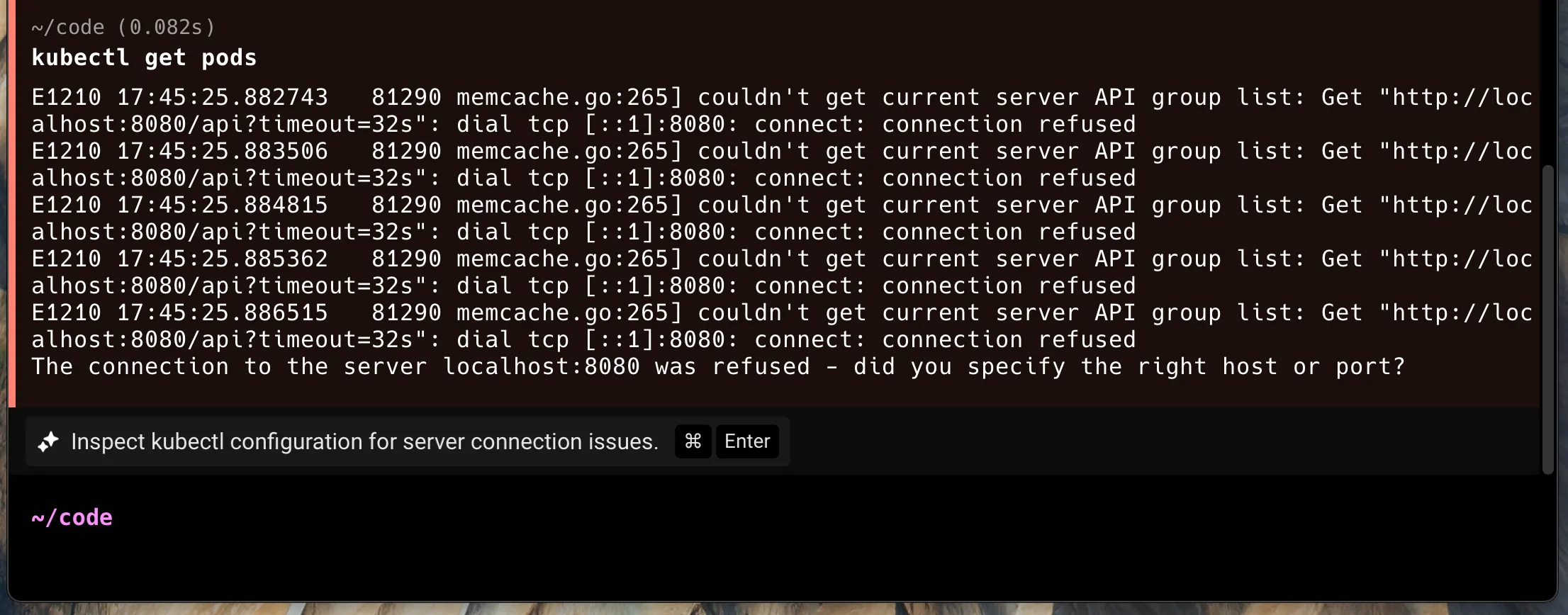
Section titled “Prompt Suggestions”Prompt Suggestions are contextual, AI-powered suggestions that activate Agent Mode. These banners will provide suggestions for what to ask Agent Mode in specific scenarios, similar to how Warp already suggests commands to run.
To disable, go to Settings > Agents > Warp Agent > Active AI > Prompt Suggestions.
Accepting a prompt suggestion
Section titled “Accepting a prompt suggestion”If you press Ctrl+Enter (on macOS), Alt+Shift+Enter (on Linux/Windows), or click on the chip, the suggestion will auto-populate into your input and run against Agent Mode (with the most recent block attached).

Next Command
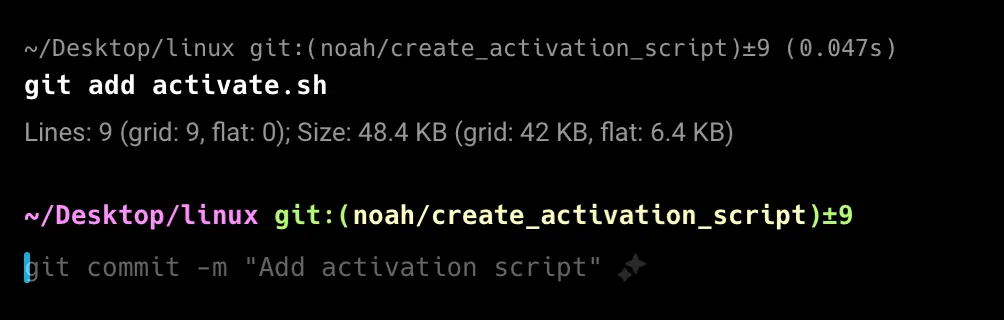
Section titled “Next Command”Next Command uses AI to suggest the next command to run based on your active terminal session and command history. It uses your active terminal session contents and an LLM to generate commands.
To disable, go to Settings > Agents > Warp Agent > Active AI > Next Command.
Accepting Next Command suggestions
Section titled “Accepting Next Command suggestions”Press → or Ctrl+F to accept a Next Command suggestion into your input buffer, then press Enter to execute it. You can change the accept keybinding (for example, to Tab) via the inline keybinding picker that appears next to the suggestion.
Billing
Section titled “Billing”Next Commands are unlimited across all of Warp’s plans, including the Free plan. For the latest information on other AI limits and other pricing details, see Warp pricing.
Suggested Code Diffs
Section titled “Suggested Code Diffs”Suggested Code Diffs automatically surface potential fixes for command-line errors encountered within Warp. These are most often compiler errors, but they may also include other situations where Warp can confidently predict a straightforward resolution, such as simple merge conflicts.
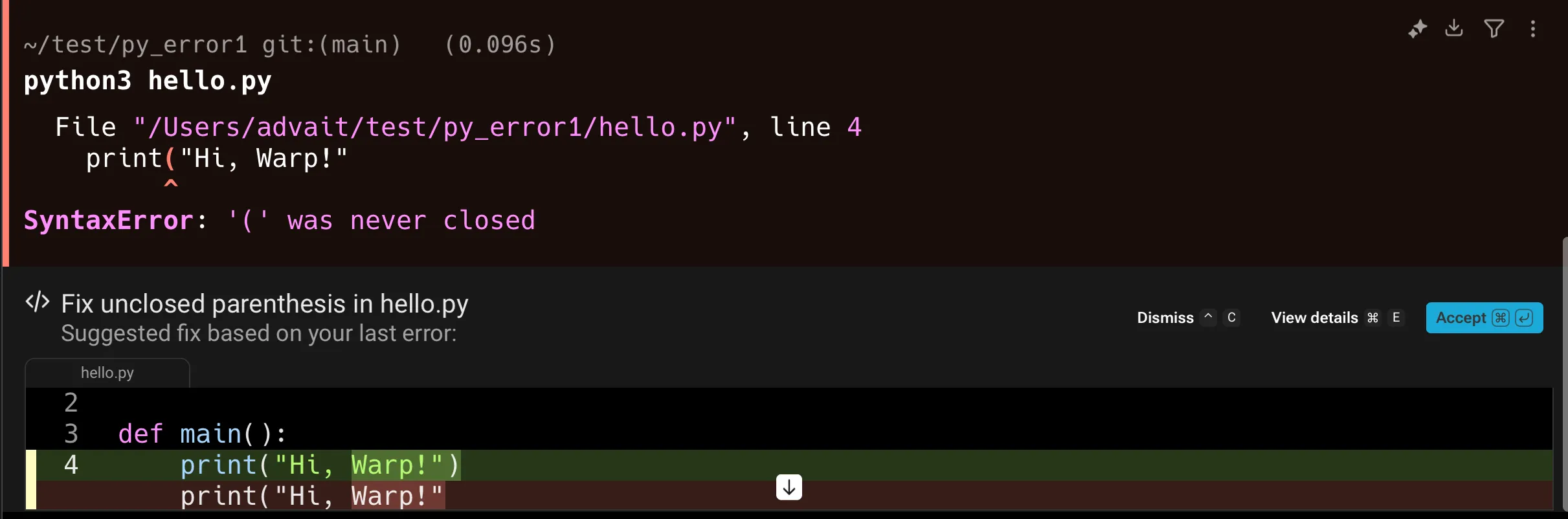
When an error occurs, Warp evaluates whether it is appropriate for an LLM to generate a fix. If so, a “Generating fix” banner will appear while Warp prepares a proposed diff. You can stop this process at any time by pressing Ctrl+C or the stop button.

Using a suggested code diff
Section titled “Using a suggested code diff”Once the diff is generated, you can either dismiss it or accept it. Acceptance can be done directly via the buttons in the diff view, or with ⌘+Enter on macOS and Ctrl+Enter on Windows/Linux.
You can also view additional details of the diff by pressing ⌘+E (macOS) or Ctrl+E (Windows/Linux), which expands the view to allow further inspection (including refining or editing it). You can also use ↓ to view the entire diff.
Billing
Suggested Code Diffs do not count toward your AI request limits. There are maximum limits to the number of code diffs surfaced per month, which scales based on your plan tier. For the latest details on plan limits and pricing, see Warp pricing.
Active AI privacy
Section titled “Active AI privacy”See our Privacy page for more information on how we handle data with Active AI.