Agents > Warp Agents
Interactive Code Review
# Interactive Code Review Interactive Code Review lets you review agent-generated code, leave inline comments on specific lines, batch your feedback, and send all requested changes to the agent in a single pass. It works with Warp's native agent and supported third-party CLI agents like Claude Code and Codex. ### Overview Interactive Code Review lets you review, annotate, and refine code generated by any supported agent, whether that's Warp's native Agent or a third-party CLI agent running in Warp. Instead of relying on an AI to review another AI's output, Warp keeps the developer in control. You can inspect diffs, leave inline comments, batch feedback, and send all requested changes back to the agent in a single pass. <VideoEmbed url="https://youtu.be/jit_6eevt8w?si=EFKYUSsofvBYUPI-" title="Interactive Code Review overview video" /> **Interactive Code Review builds on Warp's existing** [Code Review](/code/code-review/) **panel.** For details on diff views, reverting hunks, opening files, and all available entry points, see the Code Review documentation. :::note Note that both the [Code Review](/code/code-review/) panel and Interactive Code Review require working in a Git-indexed directory. ::: ### Supported agents Interactive Code Review works with any supported agent running in Warp: * **Warp's native Agent** — the built-in agent in Agent Mode * **Third-party CLI agents** — Claude Code, OpenAI Codex, OpenCode, Amp, Auggie, Copilot CLI, Cursor CLI, Gemini CLI, Droid, Pi, and Grok Build For the full feature matrix and setup details for each CLI agent, see [Third-party CLI agents](/agents/cli-agents/overview/). --- When an agent modifies files, Warp automatically gathers those edits into a diff. Opening the Code Review panel shows you every change the agent made. From there, you can leave comments on specific lines or blocks, review your comment list, and submit all feedback to the agent at once. The agent applies the requested updates and returns an updated diff for further review. This gives you a familiar pull-request style workflow inside Warp without switching editors or tools. ### Leave inline comments Select any changed line or block and add a comment describing what you want adjusted. Warp anchors each comment to the relevant file and line so the agent understands exactly what to fix. <figure style={{ maxWidth: "563px" }}>  <figcaption>Inline comments in the Code Review panel.</figcaption> </figure> ### Batch comments and submit once Add as many comments as you need before submitting them. The agent receives your entire batch of feedback, applies the changes in one iteration, and returns an updated diff for verification. <figure style={{ maxWidth: "563px" }}>  <figcaption>Adding comments directly in the Code Review view.</figcaption> </figure> ### Example demo In the example from Kevin on the Warp team, you’ll see how to: * open the Code Review panel after an agent produces changes * browse the diffs for each edited file * add multiple inline comments * review all comments in the list view * send those comments to the agent for resolution * inspect the updated diffs once the agent applies the changes This workflow can be repeated until the code matches your expectations. <VideoEmbed url="https://www.loom.com/share/bdeb2eb1ff3640faa2cbacda9420c3a8" title="Submitting inline code review feedback to an agent video" /> --- ## Next steps Once you're comfortable reviewing agent code locally, try running agents in the cloud for longer or parallel tasks. * **[Cloud Agents quickstart](/platform/quickstart/)** - Run agents on Warp's infrastructure for background tasks like PR review, issue triage, and dependency updates. * **[Attach agent session context to GitHub PRs](/guides/agent-workflows/how-to-attach-agent-session-context-to-github-prs/)** - Share the agent's prompt, plan, commands, logs, validation, and reviewer asks with the PR. * **[Skills](/agents/capabilities/skills/)** - Turn successful agent workflows into reusable, shareable instructions.Tell me about this feature: https://docs.warp.dev/agents/local-agents/interactive-code-review/Review agent-generated code, leave inline comments, and have Warp's native agent or any supported third-party CLI agent apply your feedback.
Interactive Code Review lets you review agent-generated code, leave inline comments on specific lines, batch your feedback, and send all requested changes to the agent in a single pass. It works with Warp’s native agent and supported third-party CLI agents like Claude Code and Codex.
Overview
Section titled “Overview”Interactive Code Review lets you review, annotate, and refine code generated by any supported agent, whether that’s Warp’s native Agent or a third-party CLI agent running in Warp. Instead of relying on an AI to review another AI’s output, Warp keeps the developer in control.
You can inspect diffs, leave inline comments, batch feedback, and send all requested changes back to the agent in a single pass.
Interactive Code Review builds on Warp’s existing Code Review panel. For details on diff views, reverting hunks, opening files, and all available entry points, see the Code Review documentation.
Supported agents
Section titled “Supported agents”Interactive Code Review works with any supported agent running in Warp:
- Warp’s native Agent — the built-in agent in Agent Mode
- Third-party CLI agents — Claude Code, OpenAI Codex, OpenCode, Amp, Auggie, Copilot CLI, Cursor CLI, Gemini CLI, Droid, Pi, and Grok Build
For the full feature matrix and setup details for each CLI agent, see Third-party CLI agents.
When an agent modifies files, Warp automatically gathers those edits into a diff. Opening the Code Review panel shows you every change the agent made.
From there, you can leave comments on specific lines or blocks, review your comment list, and submit all feedback to the agent at once. The agent applies the requested updates and returns an updated diff for further review.
This gives you a familiar pull-request style workflow inside Warp without switching editors or tools.
Leave inline comments
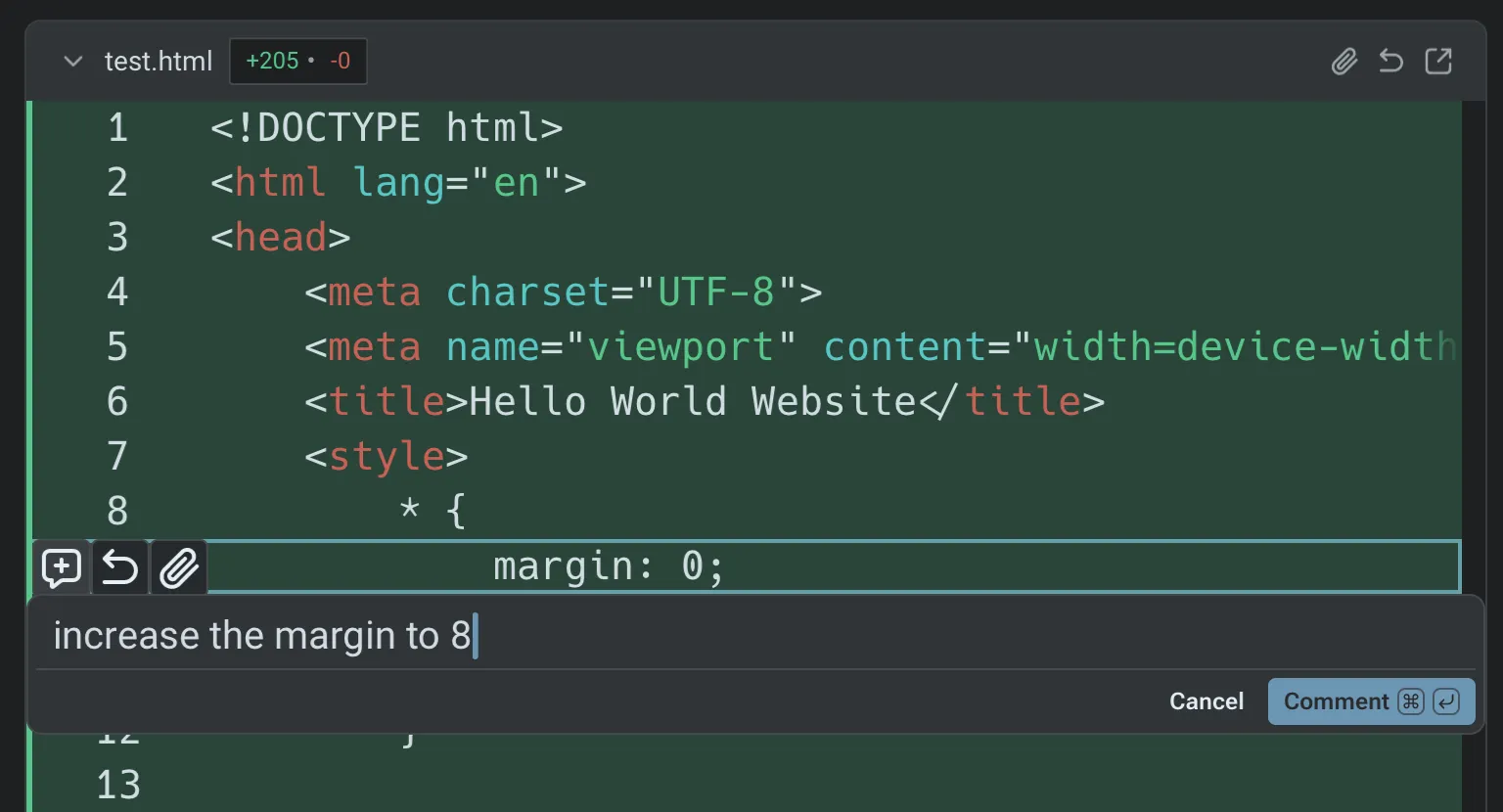
Section titled “Leave inline comments”Select any changed line or block and add a comment describing what you want adjusted. Warp anchors each comment to the relevant file and line so the agent understands exactly what to fix.
Batch comments and submit once
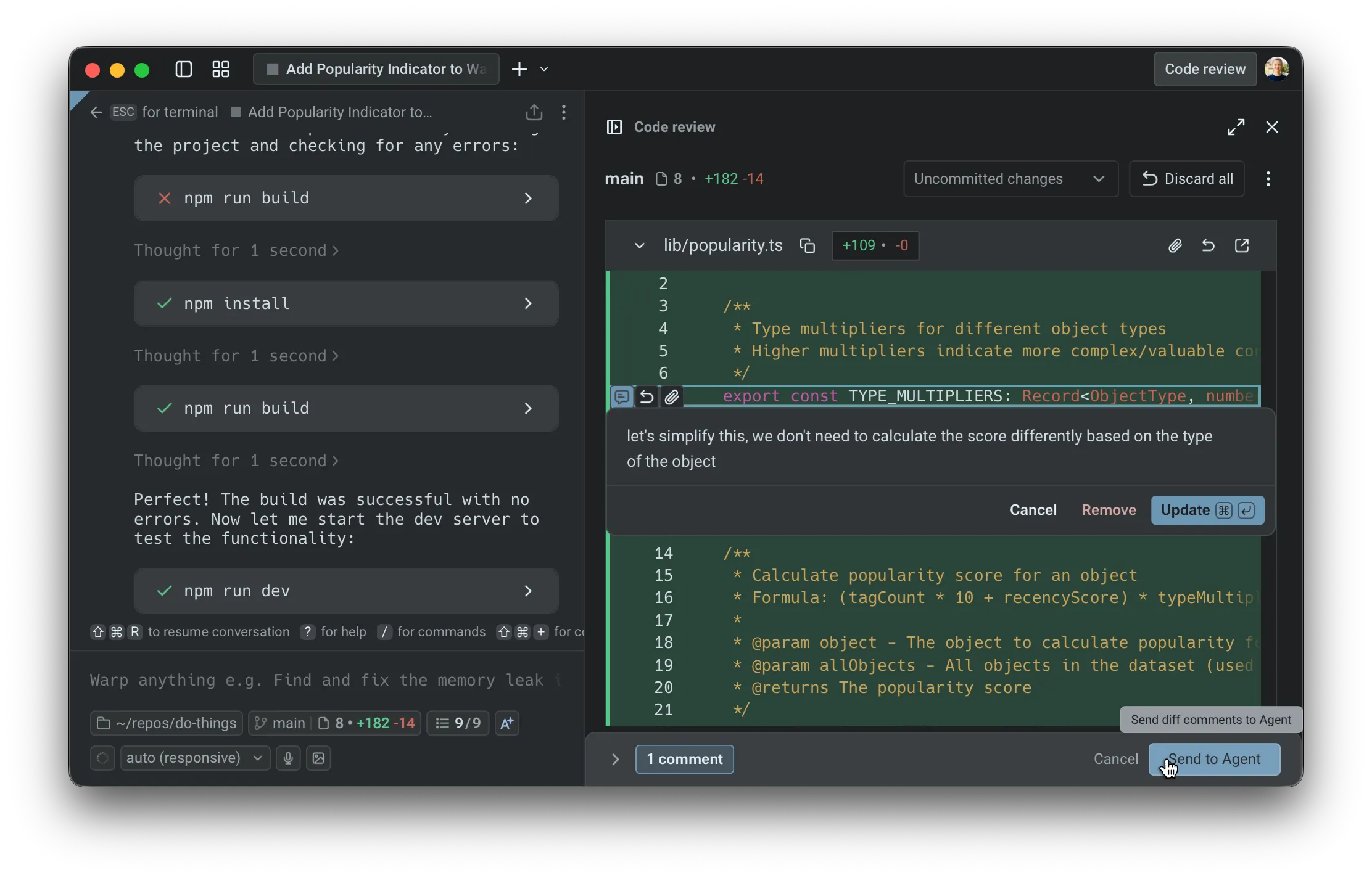
Section titled “Batch comments and submit once”Add as many comments as you need before submitting them. The agent receives your entire batch of feedback, applies the changes in one iteration, and returns an updated diff for verification.
Example demo
Section titled “Example demo”In the example from Kevin on the Warp team, you’ll see how to:
- open the Code Review panel after an agent produces changes
- browse the diffs for each edited file
- add multiple inline comments
- review all comments in the list view
- send those comments to the agent for resolution
- inspect the updated diffs once the agent applies the changes
This workflow can be repeated until the code matches your expectations.
Next steps
Section titled “Next steps”Once you’re comfortable reviewing agent code locally, try running agents in the cloud for longer or parallel tasks.
- Cloud Agents quickstart - Run agents on Warp’s infrastructure for background tasks like PR review, issue triage, and dependency updates.
- Attach agent session context to GitHub PRs - Share the agent’s prompt, plan, commands, logs, validation, and reviewer asks with the PR.
- Skills - Turn successful agent workflows into reusable, shareable instructions.