Support > Plans and billing
Warp credits and billing
# Warp credits and billing ## What are Warp credits? Warp credits pay for Warp-provided inference, hosted compute, and platform services. An agent run consumes from the credit buckets that apply to where it runs and who provides its inference. Warp meters credits across three types of infrastructure — inference, compute, and platform — each with its own bucket. Credit types and where an agent runs (local or cloud) are independent: each agent run consumes from whichever credit types apply to it. * **AI credits** cover inference: the LLM call itself. Consumed when Warp pays for the model call through Warp-managed providers. * **Compute credits** cover compute: the sandbox an agent runs in. Consumed when an agent run uses Warp-hosted compute. In practice this is cloud agent runs; local agent runs use your own machine and don't consume compute credits. See [compute credits](/support-and-community/plans-and-billing/credits/#compute-credits). * **Platform credits** cover Warp's platform layer: run lifecycle, integrations, dashboard, APIs, and observability. Apply to every cloud agent run, plus local agent runs on Business and Enterprise plans that use customer-supplied inference, including BYOK, a [ChatGPT subscription](/agents/inference/chatgpt-subscription/), a custom inference endpoint, or BYOLLM. See [platform credits](/support-and-community/plans-and-billing/platform-credits/). All three buckets draw from the same Warp credit pool and [add-on credits](/support-and-community/plans-and-billing/add-on-credits/), so you can manage them as a single balance in the Warp app under **Settings** > **Billing and usage**. When Warp provides inference, each interaction consumes **at least one AI credit**, though more complex interactions may use multiple credits. Because of factors such as codebase size, model choice, number of tool calls, and the nature of LLMs, credit usage is **non-deterministic** — two similar prompts can still use a different number of credits. :::note For a general breakdown of what factors contribute to how many credits are consumed, see [How are Warp credits calculated?](/support-and-community/plans-and-billing/credits/#how-are-warp-credits-calculated) ::: There's no exact formula for predicting usage. Experiment with different prompts and models and track how many credits they consume. ### Tracking your credit usage In an agent conversation, a **turn** represents a single exchange (a response from the LLM). To see how many credits a turn consumed, hover over the **credit count chip** at the bottom of the agent's response: <figure style={{ maxWidth: "563px" }}>  <figcaption>Conversation usage footer.</figcaption> </figure> :::note You can view your total credit usage, along with other billing details, in **Settings** > **Billing and usage**. ::: ### Credit limits and billing * **Seat-level allocation**: On team plans, credit limits apply per seat — each team member has their own allowance. Individual users (not on a team) also have their own credit allocation. * **Cloud agents and integrations**: Individual users can run cloud agents via the CLI and API, drawing from their Warp credits. Slack and Linear integrations require team membership. * **Credit limits by plan**: The Free plan doesn't include bundled AI usage for the Warp Agent. To use the Warp Agent, [upgrade to a paid plan](https://www.warp.dev/pricing), buy [add-on credits](/support-and-community/plans-and-billing/add-on-credits/) without subscribing, or bring your own inference with [Bring Your Own API Key (BYOK)](/agents/inference/bring-your-own-api-key/), a [ChatGPT subscription](/agents/inference/chatgpt-subscription/), a [custom inference endpoint](/agents/inference/custom-inference-endpoint/), or a [SuperGrok or X Premium subscription](/agents/inference/grok-subscription/). On paid plans, once you reach your monthly credit limit you can continue using AI with usage-based billing via [add-on credits](/support-and-community/plans-and-billing/add-on-credits/). ### Other features that use credits In addition to direct agent conversations, the following features also consume credits: * [Generate](/agents/local-agents/generate/) helps you look up commands and suggestions as you type. As you refine your input, multiple credits may be used before you select a final suggestion. * [AI Autofill in Workflows](/knowledge-and-collaboration/warp-drive/workflows/#ai-autofill) counts as a credit each time it is run. :::tip Regular shell commands in Warp do not consume or count towards credits. ::: ## How are Warp credits calculated? A **credit** in Warp is a unit of work representing the total processing required to complete an interaction with an agent. It is **not** the same as "one user message" — instead, it scales with the number of tokens processed during the interaction. In short: **the more tokens used, the more credits consumed**. Several factors influence how many credits are counted for a single interaction: ### 1. The LLM model used Smaller, faster models consume fewer credits than larger reasoning models. The largest frontier reasoning models (the latest Claude Opus models, for example) consume the most tokens and credits per interaction. Credit usage generally tracks the model's API pricing. :::note **Tip**: If your task doesn't require deep reasoning, planning, or multi-step problem solving, choose a more lightweight model to reduce credit usage. ::: ### 2. Tool calls triggered by the agent Agents in Warp make a variety of tool calls, including: * Searching for files (grep) * Retrieving and reading files * Making and applying code diffs * Gathering web or documentation context * Running other utilities Some prompts require only a couple of tool calls, while others may trigger many — especially if the agent needs to explore your development environment, navigate a large codebase, or apply complex changes. **More tool calls = more credits**. ### 3. Task complexity and number of steps Some tasks are straightforward and may require only a single quick response, without much thinking or reasoning. Others can involve multiple stages—such as planning, generating intermediate outputs, verifying results, applying changes, and self-correcting—each of which can add to the credits count. :::note **Tip**: Keep tasks that you give to the agent well-scoped, work incrementally, and break large changes into smaller, contained steps. ::: ### 4. Amount of context passed to the model Prompts that include large amounts of context (such as [attached blocks](/agents/local-agents/agent-context/blocks-as-context/), long user query messages, etc.) or file attachments like [images](/agents/local-agents/agent-context/images-as-context/) may also increase the number of credits used due to increased token consumption. :::note **Tip**: When sharing logs, code, or other large pieces of content, attach only the most relevant portions instead of full outputs. ::: ### 5. Prompt caching (hits and misses) Many model prompts include repeated content, like system instructions: * **Cache hits**: if the model provider can match a prefix or a part of the prompt from a past request, it can reuse results from the cache, reducing both tokens consumed and latency. * **Cache misses**: if no match is found, the full prompt may be processed again, which can increase credit consumption. Because cache results depend on model provider behavior and timing, two similar prompts may still have different credit counts, depending on when you run the commands. :::note **Tip**: Work in a continuous session when possible to improve cache hit rates. ::: These are the most common factors affecting credit usage, though there are others. Understanding them can help you manage your credits more efficiently and get the most from your plan. ## Compute credits Compute credits cover Warp-hosted compute consumed by an agent run. Cloud agent runs on Warp-hosted workers consume them; local agent runs don't, since they run on your own machine. Compute credits are sometimes called **cloud agent credits**, since only cloud agent runs consume them. Both names refer to the same bucket. ### Eligible for compute credits The following scenarios use compute credits: * **First-party integrations** - Running agents through Warp's integrations (Slack, Linear, GitHub, and others) * **Cloud agent runs** - Using `oz agent run-cloud` via the CLI * **Warp Platform API** - Running agents through Warp's API * **Cloud Mode** - Running an agent from Cloud Mode in the Warp app ### Not eligible for compute credits * **Local agent runs** - Using `oz agent run` on your local machine * **Self-hosted compute** - Using `oz agent run` on GitHub Actions, CI/CD pipelines, or other self-hosted infrastructure * **Self-hosted workers** - Cloud agent runs on your own infrastructure through Enterprise self-hosted workers. These runs still use platform credits. ## Platform credits Platform credits are billed by the agent hour, the time an agent spends working on a task. They cover Warp's platform layer (run lifecycle, integrations, dashboard, APIs, and observability) and apply to every cloud agent run, plus local agent runs on Business and Enterprise plans that use customer-supplied inference. ### Eligible for platform credits Platform credits are used in the following scenarios: * **Cloud agents on any plan** use platform credits for every cloud agent run, whichever harness, inference source, or compute source it uses. * **Local agents on Business or Enterprise with customer-supplied inference** use platform credits when the local agent run uses [Bring Your Own API Key (BYOK)](/agents/inference/bring-your-own-api-key/), a [ChatGPT subscription](/agents/inference/chatgpt-subscription/), a [custom inference endpoint](/agents/inference/custom-inference-endpoint/), or [BYOLLM](/enterprise/enterprise-features/bring-your-own-llm/). ### Not eligible for platform credits The following scenarios do **not** use platform credits: * **Local agents on Free, Build, or Max plans** don't use platform credits, whichever inference source they use. * **Local agents on Business or Enterprise using Warp-managed inference** don't use platform credits because Warp is already paying for the model call through AI credits. * **Regular terminal usage** doesn't use platform credits. Shell commands and non-AI Warp features don't consume credits. * **Third-party agent CLIs run directly** don't use platform credits when you run `claude`, `codex`, or another agent CLI outside of Warp. For a full breakdown of how platform credits work, see [platform credits](/support-and-community/plans-and-billing/platform-credits/). ## Cloud agent runs on team plans Cloud agent runs that aren't initiated by a specific team member — for example, scheduled runs or runs triggered through an agent API key — follow plan-specific billing rules. On self-serve plans (Build, Max, Business), these runs are billed to the team owner: the owner's plan-included credits first, then the team's shared add-on credit pool. With auto-reload off, the request is blocked when both are depleted (insufficient credits error). With auto-reload on, usage can trigger a reload into the team's shared pool subject to the team-wide spend cap. On Enterprise plans, these runs draw from the team-scoped credit pool per your contract. For the full waterfall, see [How are cloud agent runs on team plans billed when no individual user triggered them?](/support-and-community/plans-and-billing/pricing-faqs/#how-are-cloud-agent-runs-on-team-plans-billed-when-no-individual-user-triggered-them) in the Pricing FAQs.Tell me about this feature: https://docs.warp.dev/support-and-community/plans-and-billing/credits/How Warp credits work: the AI, compute, and platform credit buckets, what drives credit usage, and how limits and billing apply.
What are Warp credits?
Section titled “What are Warp credits?”Warp credits pay for Warp-provided inference, hosted compute, and platform services. An agent run consumes from the credit buckets that apply to where it runs and who provides its inference.
Warp meters credits across three types of infrastructure — inference, compute, and platform — each with its own bucket. Credit types and where an agent runs (local or cloud) are independent: each agent run consumes from whichever credit types apply to it.
- AI credits cover inference: the LLM call itself. Consumed when Warp pays for the model call through Warp-managed providers.
- Compute credits cover compute: the sandbox an agent runs in. Consumed when an agent run uses Warp-hosted compute. In practice this is cloud agent runs; local agent runs use your own machine and don’t consume compute credits. See compute credits.
- Platform credits cover Warp’s platform layer: run lifecycle, integrations, dashboard, APIs, and observability. Apply to every cloud agent run, plus local agent runs on Business and Enterprise plans that use customer-supplied inference, including BYOK, a ChatGPT subscription, a custom inference endpoint, or BYOLLM. See platform credits.
All three buckets draw from the same Warp credit pool and add-on credits, so you can manage them as a single balance in the Warp app under Settings > Billing and usage.
When Warp provides inference, each interaction consumes at least one AI credit, though more complex interactions may use multiple credits. Because of factors such as codebase size, model choice, number of tool calls, and the nature of LLMs, credit usage is non-deterministic — two similar prompts can still use a different number of credits.
There’s no exact formula for predicting usage. Experiment with different prompts and models and track how many credits they consume.
Tracking your credit usage
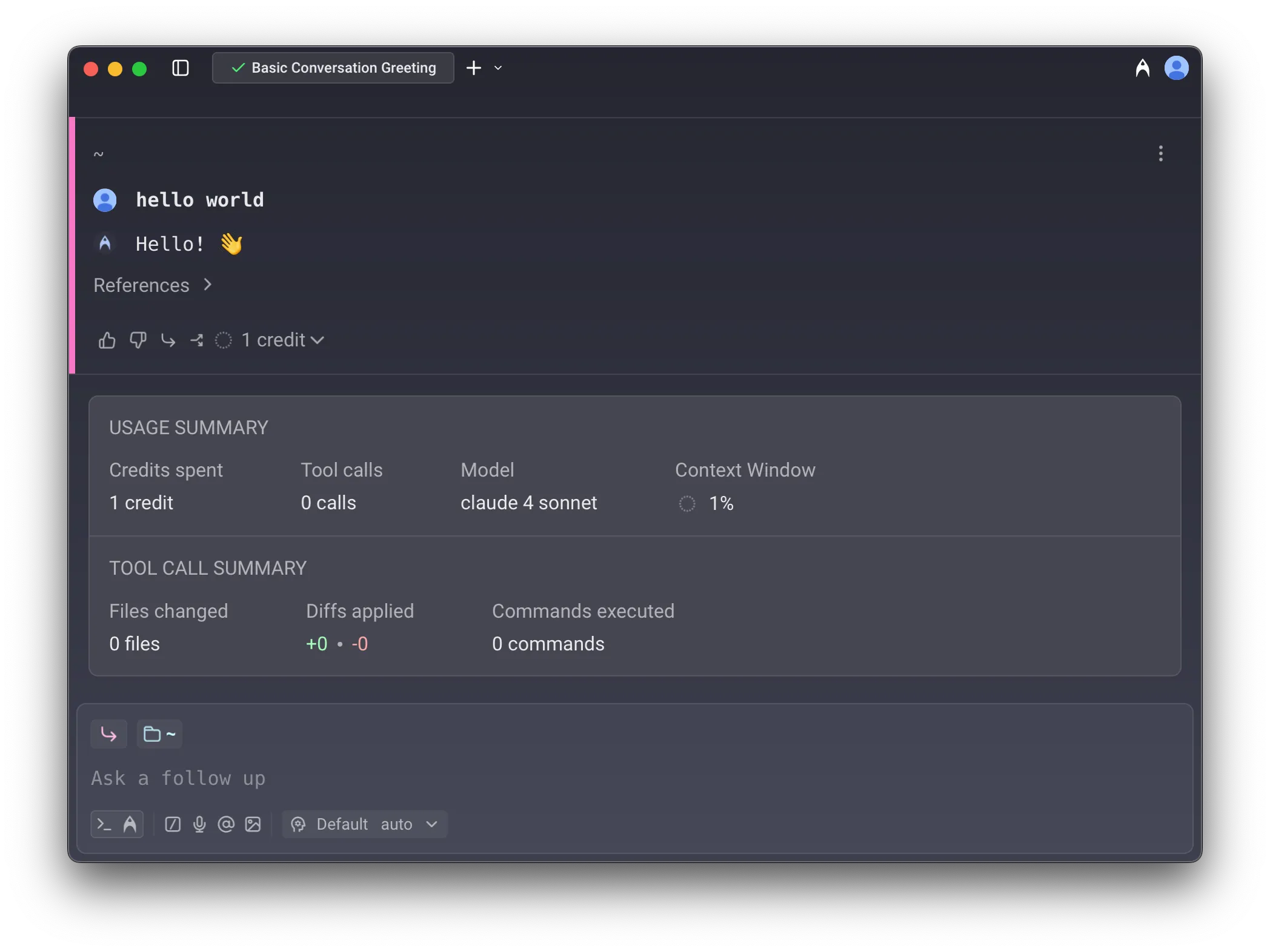
Section titled “Tracking your credit usage”In an agent conversation, a turn represents a single exchange (a response from the LLM). To see how many credits a turn consumed, hover over the credit count chip at the bottom of the agent’s response:
Credit limits and billing
Section titled “Credit limits and billing”- Seat-level allocation: On team plans, credit limits apply per seat — each team member has their own allowance. Individual users (not on a team) also have their own credit allocation.
- Cloud agents and integrations: Individual users can run cloud agents via the CLI and API, drawing from their Warp credits. Slack and Linear integrations require team membership.
- Credit limits by plan: The Free plan doesn’t include bundled AI usage for the Warp Agent. To use the Warp Agent, upgrade to a paid plan, buy add-on credits without subscribing, or bring your own inference with Bring Your Own API Key (BYOK), a ChatGPT subscription, a custom inference endpoint, or a SuperGrok or X Premium subscription. On paid plans, once you reach your monthly credit limit you can continue using AI with usage-based billing via add-on credits.
Other features that use credits
Section titled “Other features that use credits”In addition to direct agent conversations, the following features also consume credits:
- Generate helps you look up commands and suggestions as you type. As you refine your input, multiple credits may be used before you select a final suggestion.
- AI Autofill in Workflows counts as a credit each time it is run.
How are Warp credits calculated?
Section titled “How are Warp credits calculated?”A credit in Warp is a unit of work representing the total processing required to complete an interaction with an agent. It is not the same as “one user message” — instead, it scales with the number of tokens processed during the interaction.
In short: the more tokens used, the more credits consumed.
Several factors influence how many credits are counted for a single interaction:
1. The LLM model used
Section titled “1. The LLM model used”Smaller, faster models consume fewer credits than larger reasoning models. The largest frontier reasoning models (the latest Claude Opus models, for example) consume the most tokens and credits per interaction. Credit usage generally tracks the model’s API pricing.
2. Tool calls triggered by the agent
Section titled “2. Tool calls triggered by the agent”Agents in Warp make a variety of tool calls, including:
- Searching for files (grep)
- Retrieving and reading files
- Making and applying code diffs
- Gathering web or documentation context
- Running other utilities
Some prompts require only a couple of tool calls, while others may trigger many — especially if the agent needs to explore your development environment, navigate a large codebase, or apply complex changes. More tool calls = more credits.
3. Task complexity and number of steps
Section titled “3. Task complexity and number of steps”Some tasks are straightforward and may require only a single quick response, without much thinking or reasoning. Others can involve multiple stages—such as planning, generating intermediate outputs, verifying results, applying changes, and self-correcting—each of which can add to the credits count.
4. Amount of context passed to the model
Section titled “4. Amount of context passed to the model”Prompts that include large amounts of context (such as attached blocks, long user query messages, etc.) or file attachments like images may also increase the number of credits used due to increased token consumption.
5. Prompt caching (hits and misses)
Section titled “5. Prompt caching (hits and misses)”Many model prompts include repeated content, like system instructions:
- Cache hits: if the model provider can match a prefix or a part of the prompt from a past request, it can reuse results from the cache, reducing both tokens consumed and latency.
- Cache misses: if no match is found, the full prompt may be processed again, which can increase credit consumption.
Because cache results depend on model provider behavior and timing, two similar prompts may still have different credit counts, depending on when you run the commands.
These are the most common factors affecting credit usage, though there are others. Understanding them can help you manage your credits more efficiently and get the most from your plan.
Compute credits
Section titled “Compute credits”Compute credits cover Warp-hosted compute consumed by an agent run. Cloud agent runs on Warp-hosted workers consume them; local agent runs don’t, since they run on your own machine.
Compute credits are sometimes called cloud agent credits, since only cloud agent runs consume them. Both names refer to the same bucket.
Eligible for compute credits
Section titled “Eligible for compute credits”The following scenarios use compute credits:
- First-party integrations - Running agents through Warp’s integrations (Slack, Linear, GitHub, and others)
- Cloud agent runs - Using
oz agent run-cloudvia the CLI - Warp Platform API - Running agents through Warp’s API
- Cloud Mode - Running an agent from Cloud Mode in the Warp app
Not eligible for compute credits
Section titled “Not eligible for compute credits”- Local agent runs - Using
oz agent runon your local machine - Self-hosted compute - Using
oz agent runon GitHub Actions, CI/CD pipelines, or other self-hosted infrastructure - Self-hosted workers - Cloud agent runs on your own infrastructure through Enterprise self-hosted workers. These runs still use platform credits.
Platform credits
Section titled “Platform credits”Platform credits are billed by the agent hour, the time an agent spends working on a task. They cover Warp’s platform layer (run lifecycle, integrations, dashboard, APIs, and observability) and apply to every cloud agent run, plus local agent runs on Business and Enterprise plans that use customer-supplied inference.
Eligible for platform credits
Section titled “Eligible for platform credits”Platform credits are used in the following scenarios:
- Cloud agents on any plan use platform credits for every cloud agent run, whichever harness, inference source, or compute source it uses.
- Local agents on Business or Enterprise with customer-supplied inference use platform credits when the local agent run uses Bring Your Own API Key (BYOK), a ChatGPT subscription, a custom inference endpoint, or BYOLLM.
Not eligible for platform credits
Section titled “Not eligible for platform credits”The following scenarios do not use platform credits:
- Local agents on Free, Build, or Max plans don’t use platform credits, whichever inference source they use.
- Local agents on Business or Enterprise using Warp-managed inference don’t use platform credits because Warp is already paying for the model call through AI credits.
- Regular terminal usage doesn’t use platform credits. Shell commands and non-AI Warp features don’t consume credits.
- Third-party agent CLIs run directly don’t use platform credits when you run
claude,codex, or another agent CLI outside of Warp.
For a full breakdown of how platform credits work, see platform credits.
Cloud agent runs on team plans
Section titled “Cloud agent runs on team plans”Cloud agent runs that aren’t initiated by a specific team member — for example, scheduled runs or runs triggered through an agent API key — follow plan-specific billing rules. On self-serve plans (Build, Max, Business), these runs are billed to the team owner: the owner’s plan-included credits first, then the team’s shared add-on credit pool. With auto-reload off, the request is blocked when both are depleted (insufficient credits error). With auto-reload on, usage can trigger a reload into the team’s shared pool subject to the team-wide spend cap. On Enterprise plans, these runs draw from the team-scoped credit pool per your contract.
For the full waterfall, see How are cloud agent runs on team plans billed when no individual user triggered them? in the Pricing FAQs.