Terminal > Command entry
Command Search
# Command Search The Command Search panel provides unified search across all your terminal inputs, saved commands, and [Terminal and Agent modes](/agents/local-agents/interacting-with-agents/terminal-and-agent-modes/) conversation history. Use it to quickly find and reuse commands, workflows, or past agent interactions.  :::note Tailor your Command Search experience by toggling off "Show Global Workflows" in **Settings** > **Features** > **Workflows**. When disabled, your search will exclusively encompass YAML and Warp Drive Workflows. ::: ## Quickstart 1. Press `Ctrl+R` to open the Command Search Panel 2. Type your search query in the input box 3. Press `Enter` to input the selected command into Warp's Input Editor If your shell has rebound `Ctrl+R` to its own history widget — for example **fzf**, **atuin**, or fish's **PatrickF1/fzf.fish** — Warp hands that keypress off to the shell widget instead of opening Command Search. Open Warp's Command Search from the Command Palette when you need the unified panel (history, workflows, prompts, and agent conversations) while those shell widgets are installed. ## fzf shortcuts For fzf, Warp also hands off these shortcuts at an idle prompt; atuin only receives the `Ctrl+R` handoff. * `Ctrl+T` - Opens fzf's file-search widget. * `⌥+C` (macOS) or `Alt+C` (Windows/Linux) - Opens fzf's directory-search widget and changes to the selected directory. ## Search filters You can filter your search results by prepending your search term with any of the following: <table><thead><tr><th width="215.78436279296875">Filter</th><th>Shortcuts</th></tr></thead><tbody><tr><td>Command History</td><td><code>history:</code>, <code>h:</code>, or <code>H-TAB</code></td></tr><tr><td>Prompts</td><td><code>prompts:</code>, <code>p:</code>, or <code>P-TAB</code></td></tr><tr><td><a href="/agents/local-agents/interacting-with-agents/">Agent Mode</a> History</td><td><code>ai_history:</code>, <code>a:</code>, or <code>A-TAB</code></td></tr></tbody></table> :::note When a filter is activated, it will be bolded and italicized in the search panel. ::: ## Additional features * You can expand the menu horizontally by dragging the right edge * The panel supports fuzzy search and ranks results by relevance ## How it works <VideoEmbed url="https://www.loom.com/share/21a6f58a33754ee7913edbff6d33d8d1?hideEmbedTopBar=true&hide_owner=true&hide_share=true&hide_title=true" title="Command Search Demo" />Tell me about this feature: https://docs.warp.dev/terminal/entry/command-search/Search command history, Workflows, Prompts, and agent conversations with fuzzy matching.
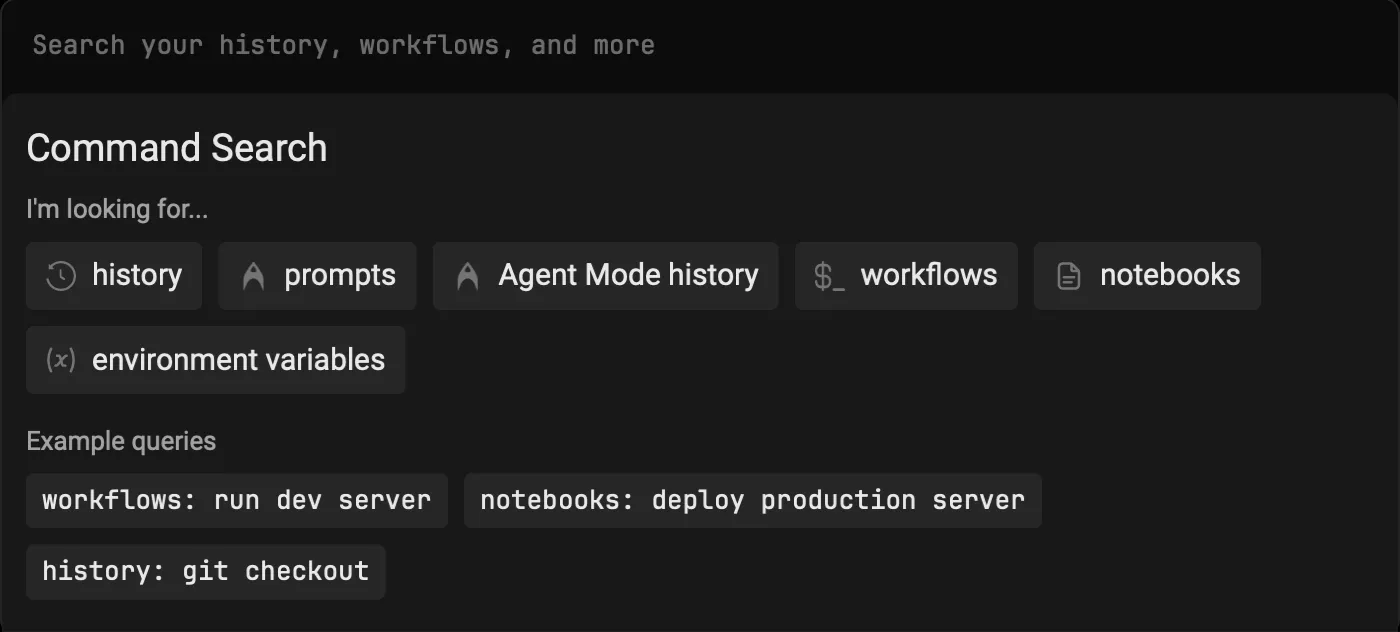
The Command Search panel provides unified search across all your terminal inputs, saved commands, and Terminal and Agent modes conversation history. Use it to quickly find and reuse commands, workflows, or past agent interactions.
Quickstart
Section titled “Quickstart”- Press
Ctrl+Rto open the Command Search Panel - Type your search query in the input box
- Press
Enterto input the selected command into Warp’s Input Editor
If your shell has rebound Ctrl+R to its own history widget — for example fzf, atuin, or fish’s PatrickF1/fzf.fish — Warp hands that keypress off to the shell widget instead of opening Command Search. Open Warp’s Command Search from the Command Palette when you need the unified panel (history, workflows, prompts, and agent conversations) while those shell widgets are installed.
fzf shortcuts
Section titled “fzf shortcuts”For fzf, Warp also hands off these shortcuts at an idle prompt; atuin only receives the Ctrl+R handoff.
Ctrl+T- Opens fzf’s file-search widget.⌥+C(macOS) orAlt+C(Windows/Linux) - Opens fzf’s directory-search widget and changes to the selected directory.
Search filters
Section titled “Search filters”You can filter your search results by prepending your search term with any of the following:
| Filter | Shortcuts |
|---|---|
| Command History | history:, h:, or H-TAB |
| Prompts | prompts:, p:, or P-TAB |
| Agent Mode History | ai_history:, a:, or A-TAB |
Additional features
Section titled “Additional features”- You can expand the menu horizontally by dragging the right edge
- The panel supports fuzzy search and ranks results by relevance