Enterprise > Enterprise features
Architecture and deployment
# Architecture and deployment Warp's architecture separates the **control plane** (orchestration, observability, and LLM inference) from the **execution plane** (where agents run, code is accessed, and commands execute). This separation gives enterprise teams flexibility to choose where sensitive workloads run while maintaining centralized management and visibility. Use this information to evaluate which deployment model fits your organization's security, compliance, and operational requirements. ## System architecture overview Warp's cloud agent infrastructure has four key components: 1. **Trigger** - What starts an agent run (CI step, webhook, cron schedule, Slack mention, CLI command, or API/SDK call). 2. **Orchestration** - What decides what to run and tracks it (Automation Platform orchestrator or your own system). 3. **Execution** - Where the agent actually runs (Warp-hosted environment, your infrastructure, or your existing CI/orchestrator). 4. **Visibility** - How the team monitors and intervenes (cloud agent dashboard, session sharing, APIs/SDKs).  The [stack overview](/platform/architecture/#stack-overview) reference describes each component in this diagram. ### High-level data flow * **Warp terminal (client)** ↔ **Warp backend (control plane)** ↔ **LLM providers** * The Warp backend handles task orchestration, observability, and LLM inference routing. * LLM providers operate under **Zero Data Retention (ZDR)** agreements. They do not store or train on your data. * The **execution plane** is where source code is accessed, commands run, and build artifacts are produced. This can run on Warp's infrastructure or yours. ## Warp-hosted (SaaS) Warp-hosted is the default deployment model. Agents run on Warp-managed infrastructure with no setup required from your team. ### How it works * Agents execute in **isolated Docker containers** on Warp-hosted infrastructure (GCP). * The Automation Platform orchestrator manages agent lifecycle - provisioning, execution, monitoring, and cleanup. * Environments are ephemeral and destroyed after each run. ### Triggers Warp-hosted agents can be triggered by: * **First-party integrations** - Slack, Linear, and other connected tools * **Scheduled agents** - Cron-like automation for recurring work * **CLI** - `oz agent run-cloud` for on-demand cloud execution * **API/SDK** - Programmatic triggers from your own systems ### When to use * You want the simplest path to scalable cloud agent execution. * You need to run many tasks in parallel without building sandboxing infrastructure. * Your security requirements are met by Warp's SOC 2 Type II certified infrastructure with ZDR. ## Self-hosted execution For organizations that need agent execution and source code to remain within their own network boundary, Warp supports self-hosted execution. :::note Self-hosted execution is available exclusively on Warp's **Enterprise** plan. ::: ### Split architecture Self-hosted deployments use a split architecture: * **Execution plane (customer-hosted)** - Source code repositories, build artifacts, shell commands, and runtime secrets stay on your infrastructure. Note that during agent interactions, code context is included in LLM prompts and session transcripts that route through Warp's servers under ZDR agreements (see [What transits Warp's servers](#what-transits-warps-servers)). * **Control plane (Warp-hosted)** - Task orchestration, observability data, and LLM inference route through Warp's servers under Zero Data Retention (ZDR) agreements. ### Deployment modes **Unmanaged** - Use `oz agent run` to run agents in your existing orchestrator or CI environment. Supports Linux, macOS, and Windows with no Docker dependency. * Best for teams that already have CI/CD infrastructure or internal orchestrators. * You control scheduling, scaling, and environment setup. * Warp provides cloud connectivity, shared context, visibility, and session sharing. **Managed** - Run the `oz-agent-worker` daemon to let Warp orchestrate agents in isolated Docker containers on your infrastructure. * The worker process connects to the Automation Platform via WebSocket and receives tasks automatically. * Agents run in isolated Docker containers managed by the worker. * You get the same orchestration capabilities as Warp-hosted, but execution stays on your infrastructure. ### Network requirements Self-hosted agents require **outbound-only** network access. No inbound network access is required. **Egress requirements:** * Outbound access to Warp's backend services (for orchestration and observability) * For managed mode: access to Docker Hub and GitHub (for container images and repository access) ### When to use * Compliance or security requirements prevent using Warp-hosted compute. * Source code and execution must stay within your network boundary. * You want Automation Platform orchestration and visibility without sending code to Warp's infrastructure. ## Hybrid deployments Organizations can combine Warp-hosted and self-hosted execution to balance convenience with security requirements. ### How it works * Route sensitive workloads (e.g., production code, regulated data) to self-hosted agents. * Route less sensitive workloads (e.g., open-source tooling, internal utilities) to Warp-hosted agents. * Both execution modes share the same cloud agent dashboard, session sharing, and API/SDK visibility. ### Example configurations * **By sensitivity** - Production repositories run on self-hosted agents; staging and development run on Warp-hosted. * **By team** - Security-sensitive teams (e.g., infrastructure, payments) use self-hosted; other teams use Warp-hosted. * **By task type** - Scheduled maintenance tasks run on Warp-hosted; ad-hoc debugging runs self-hosted in dev environments. ## Data flow and boundaries Understanding what data stays where is critical for security and compliance decisions. ### What stays on customer infrastructure (self-hosted) * **Source code** - Repository contents and version history * **Build artifacts** - Compiled outputs and generated files * **Shell commands** - Terminal commands and their output * **Runtime secrets** - Environment variables and credentials * **Execution logs** - Agent run logs and diagnostics ### What transits Warp's servers * **Task orchestration** - Scheduling, routing, and lifecycle management * **Observability data** - Run status, duration, and metadata * **LLM inference** - Prompts and responses (which include code context from agent interactions) routed through Warp to contracted LLM providers under ZDR agreements * **Session sharing data** - Session transcripts, which include code context from agent interactions, when session sharing is enabled for monitoring and collaboration ## Choosing a deployment model Consider the following when selecting a deployment model:  **Warp-hosted** is right if: * You want zero infrastructure management for agent execution. * Your security team is comfortable with SOC 2 Type II certified, ZDR-covered infrastructure. * You need maximum parallelization and scalability. **Self-hosted** is right if: * Compliance requirements mandate that code stays within your network. * You need to integrate with existing CI/CD or infrastructure tooling. * You want full control over the execution environment. **Hybrid** is right if: * Different teams or repositories have different security requirements. * You want the convenience of Warp-hosted for most work but need self-hosted for sensitive workloads. ## Related resources * [Architecture reference](/platform/architecture/) - Diagrams of the stack, the run lifecycle, self-hosted execution, and data boundaries * [Deployment Patterns](/factories/deployment-patterns/) - Detailed patterns for CLI-only, Automation Platform-hosted, and self-hosted setups * [Security overview](/enterprise/security-and-compliance/security-overview/) - Data handling, encryption, and compliance details * [Bring Your Own LLM](/enterprise/enterprise-features/bring-your-own-llm/) - Route inference through your own cloud infrastructure * [Admin Panel](/enterprise/team-management/admin-panel/) - Configure agent policies and security settings * [Contact sales](https://www.warp.dev/contact-sales) - Discuss deployment options for your organizationTell me about this feature: https://docs.warp.dev/enterprise/enterprise-features/architecture-and-deployment/Understand Warp's system architecture and choose the right deployment model for your organization - Warp-hosted, self-hosted, or hybrid.
Warp’s architecture separates the control plane (orchestration, observability, and LLM inference) from the execution plane (where agents run, code is accessed, and commands execute). This separation gives enterprise teams flexibility to choose where sensitive workloads run while maintaining centralized management and visibility.
Use this information to evaluate which deployment model fits your organization’s security, compliance, and operational requirements.
System architecture overview
Section titled “System architecture overview”Warp’s cloud agent infrastructure has four key components:
- Trigger - What starts an agent run (CI step, webhook, cron schedule, Slack mention, CLI command, or API/SDK call).
- Orchestration - What decides what to run and tracks it (Automation Platform orchestrator or your own system).
- Execution - Where the agent actually runs (Warp-hosted environment, your infrastructure, or your existing CI/orchestrator).
- Visibility - How the team monitors and intervenes (cloud agent dashboard, session sharing, APIs/SDKs).
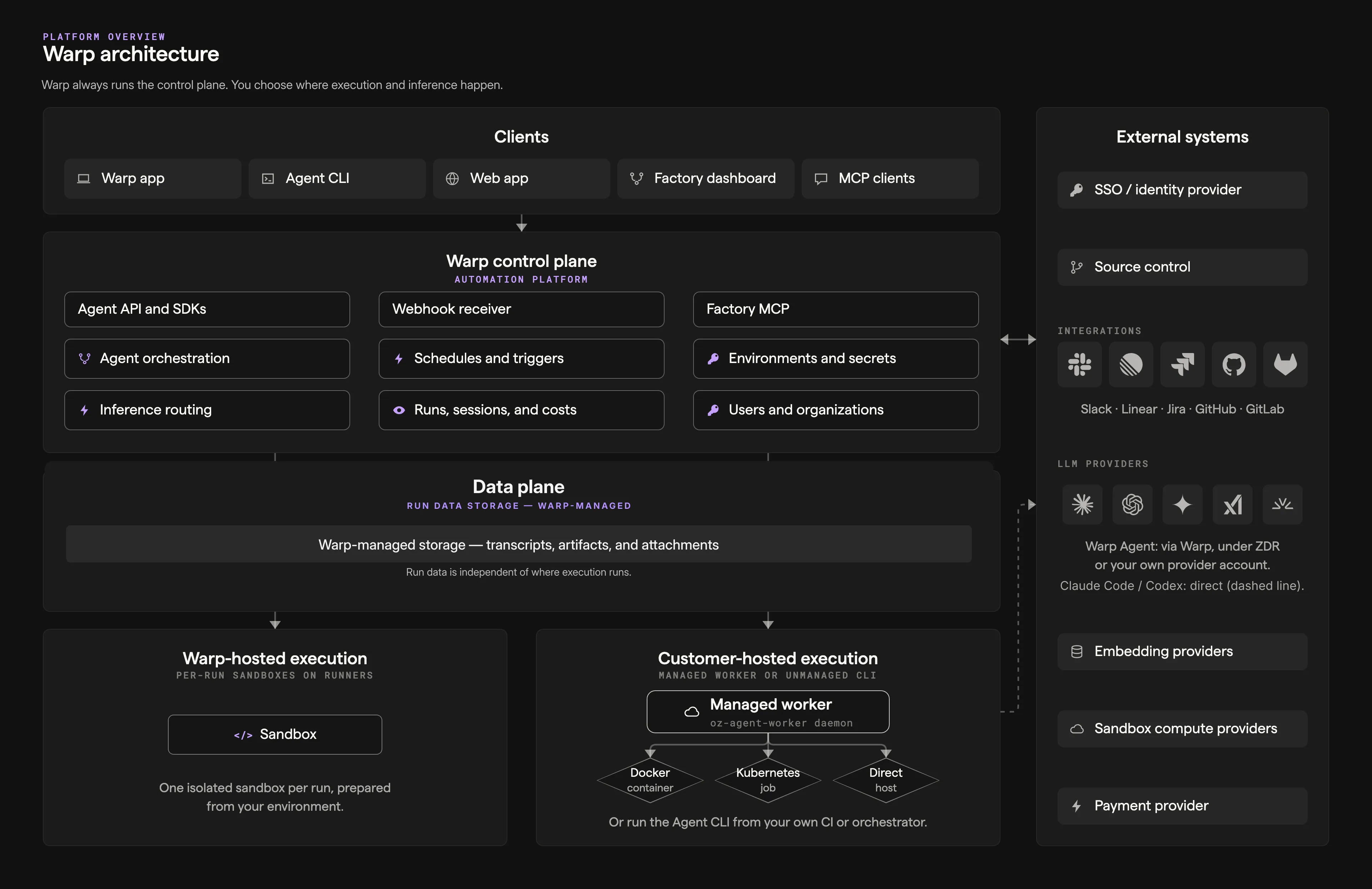
The stack overview reference describes each component in this diagram.
High-level data flow
Section titled “High-level data flow”- Warp terminal (client) ↔ Warp backend (control plane) ↔ LLM providers
- The Warp backend handles task orchestration, observability, and LLM inference routing.
- LLM providers operate under Zero Data Retention (ZDR) agreements. They do not store or train on your data.
- The execution plane is where source code is accessed, commands run, and build artifacts are produced. This can run on Warp’s infrastructure or yours.
Warp-hosted (SaaS)
Section titled “Warp-hosted (SaaS)”Warp-hosted is the default deployment model. Agents run on Warp-managed infrastructure with no setup required from your team.
How it works
Section titled “How it works”- Agents execute in isolated Docker containers on Warp-hosted infrastructure (GCP).
- The Automation Platform orchestrator manages agent lifecycle - provisioning, execution, monitoring, and cleanup.
- Environments are ephemeral and destroyed after each run.
Triggers
Section titled “Triggers”Warp-hosted agents can be triggered by:
- First-party integrations - Slack, Linear, and other connected tools
- Scheduled agents - Cron-like automation for recurring work
- CLI -
oz agent run-cloudfor on-demand cloud execution - API/SDK - Programmatic triggers from your own systems
When to use
Section titled “When to use”- You want the simplest path to scalable cloud agent execution.
- You need to run many tasks in parallel without building sandboxing infrastructure.
- Your security requirements are met by Warp’s SOC 2 Type II certified infrastructure with ZDR.
Self-hosted execution
Section titled “Self-hosted execution”For organizations that need agent execution and source code to remain within their own network boundary, Warp supports self-hosted execution.
Split architecture
Section titled “Split architecture”Self-hosted deployments use a split architecture:
- Execution plane (customer-hosted) - Source code repositories, build artifacts, shell commands, and runtime secrets stay on your infrastructure. Note that during agent interactions, code context is included in LLM prompts and session transcripts that route through Warp’s servers under ZDR agreements (see What transits Warp’s servers).
- Control plane (Warp-hosted) - Task orchestration, observability data, and LLM inference route through Warp’s servers under Zero Data Retention (ZDR) agreements.
Deployment modes
Section titled “Deployment modes”Unmanaged - Use oz agent run to run agents in your existing orchestrator or CI environment. Supports Linux, macOS, and Windows with no Docker dependency.
- Best for teams that already have CI/CD infrastructure or internal orchestrators.
- You control scheduling, scaling, and environment setup.
- Warp provides cloud connectivity, shared context, visibility, and session sharing.
Managed - Run the oz-agent-worker daemon to let Warp orchestrate agents in isolated Docker containers on your infrastructure.
- The worker process connects to the Automation Platform via WebSocket and receives tasks automatically.
- Agents run in isolated Docker containers managed by the worker.
- You get the same orchestration capabilities as Warp-hosted, but execution stays on your infrastructure.
Network requirements
Section titled “Network requirements”Self-hosted agents require outbound-only network access. No inbound network access is required.
Egress requirements:
- Outbound access to Warp’s backend services (for orchestration and observability)
- For managed mode: access to Docker Hub and GitHub (for container images and repository access)
When to use
Section titled “When to use”- Compliance or security requirements prevent using Warp-hosted compute.
- Source code and execution must stay within your network boundary.
- You want Automation Platform orchestration and visibility without sending code to Warp’s infrastructure.
Hybrid deployments
Section titled “Hybrid deployments”Organizations can combine Warp-hosted and self-hosted execution to balance convenience with security requirements.
How it works
Section titled “How it works”- Route sensitive workloads (e.g., production code, regulated data) to self-hosted agents.
- Route less sensitive workloads (e.g., open-source tooling, internal utilities) to Warp-hosted agents.
- Both execution modes share the same cloud agent dashboard, session sharing, and API/SDK visibility.
Example configurations
Section titled “Example configurations”- By sensitivity - Production repositories run on self-hosted agents; staging and development run on Warp-hosted.
- By team - Security-sensitive teams (e.g., infrastructure, payments) use self-hosted; other teams use Warp-hosted.
- By task type - Scheduled maintenance tasks run on Warp-hosted; ad-hoc debugging runs self-hosted in dev environments.
Data flow and boundaries
Section titled “Data flow and boundaries”Understanding what data stays where is critical for security and compliance decisions.
What stays on customer infrastructure (self-hosted)
Section titled “What stays on customer infrastructure (self-hosted)”- Source code - Repository contents and version history
- Build artifacts - Compiled outputs and generated files
- Shell commands - Terminal commands and their output
- Runtime secrets - Environment variables and credentials
- Execution logs - Agent run logs and diagnostics
What transits Warp’s servers
Section titled “What transits Warp’s servers”- Task orchestration - Scheduling, routing, and lifecycle management
- Observability data - Run status, duration, and metadata
- LLM inference - Prompts and responses (which include code context from agent interactions) routed through Warp to contracted LLM providers under ZDR agreements
- Session sharing data - Session transcripts, which include code context from agent interactions, when session sharing is enabled for monitoring and collaboration
Choosing a deployment model
Section titled “Choosing a deployment model”Consider the following when selecting a deployment model:
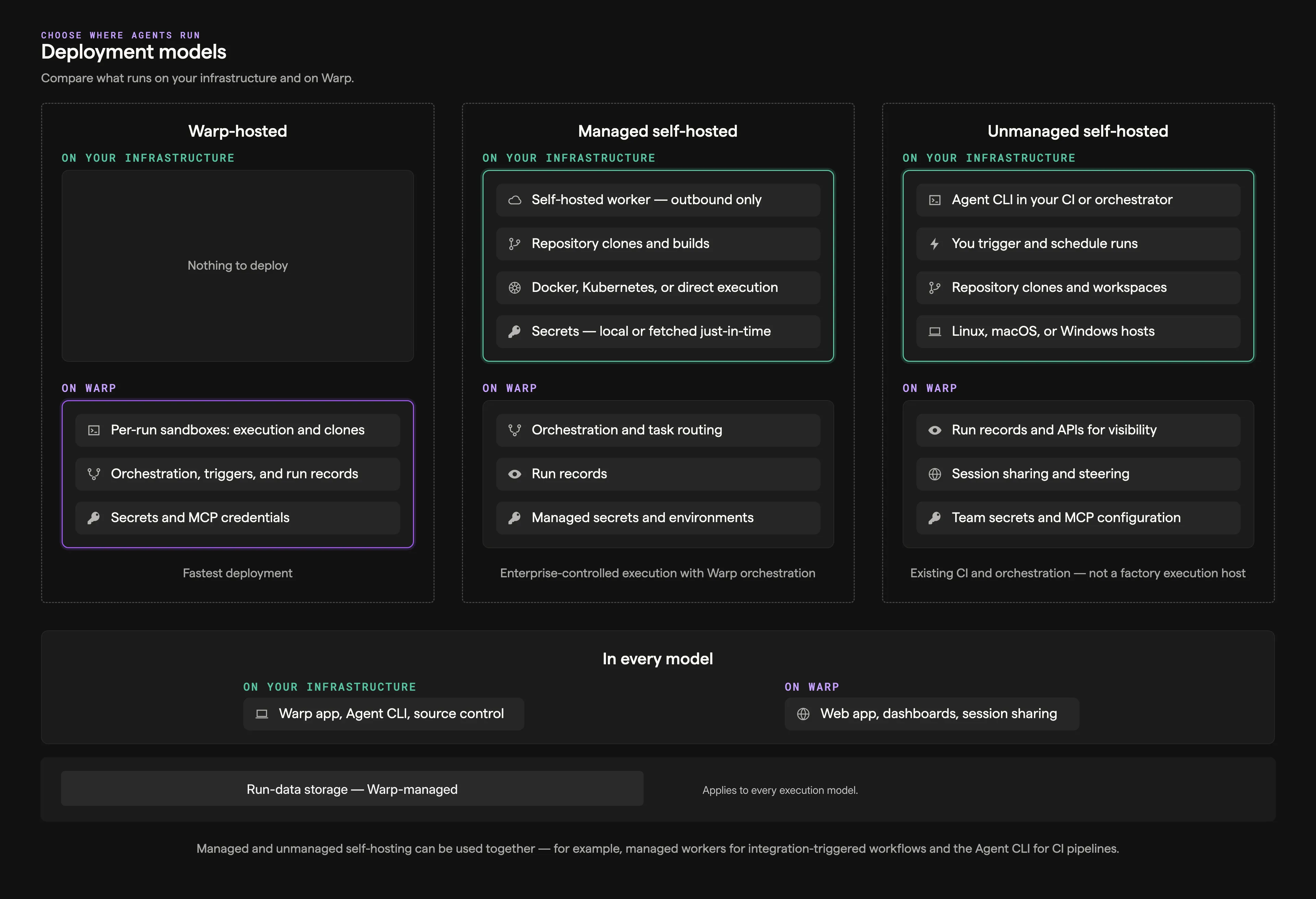
Warp-hosted is right if:
- You want zero infrastructure management for agent execution.
- Your security team is comfortable with SOC 2 Type II certified, ZDR-covered infrastructure.
- You need maximum parallelization and scalability.
Self-hosted is right if:
- Compliance requirements mandate that code stays within your network.
- You need to integrate with existing CI/CD or infrastructure tooling.
- You want full control over the execution environment.
Hybrid is right if:
- Different teams or repositories have different security requirements.
- You want the convenience of Warp-hosted for most work but need self-hosted for sensitive workloads.
Related resources
Section titled “Related resources”- Architecture reference - Diagrams of the stack, the run lifecycle, self-hosted execution, and data boundaries
- Deployment Patterns - Detailed patterns for CLI-only, Automation Platform-hosted, and self-hosted setups
- Security overview - Data handling, encryption, and compliance details
- Bring Your Own LLM - Route inference through your own cloud infrastructure
- Admin Panel - Configure agent policies and security settings
- Contact sales - Discuss deployment options for your organization