Support & Community > Plans and billing
Add-on credits
# Add-on credits Add-on credits let you continue using premium AI models even after you've reached your monthly credit limit — at lower rates and with more control over spending. You can manage and purchase add-on credits directly in **Settings** > **Billing and usage**.  ### How do add-on credits work? Add-on credits extend your AI usage beyond the included monthly quota in your plan. Once your plan’s credits are used up, Warp will automatically begin drawing from your available add-on credits. If you’ve enabled **auto-reload**, new credits will be added automatically and billed based on your selected configuration of monthly spending limit and selected purchase amount. Add-on credits are available for Build, Max, Business, and Enterprise plans (with custom pricing for Enterprise). On self-serve plans (Build, Max, and Business), add-on credits are scoped to each individual user; Enterprise uses a team-pooled model. These credits **roll over across billing cycles** and remain valid for **12 months from the purchase date**. Add-on credits draw from the same pool as [platform credits](/support-and-community/plans-and-billing/platform-credits/) and compute credits, so a single balance covers all three credit types. ### Purchasing add-on credits You have two options for purchasing more credits: #### 1. Buy on-demand You can purchase additional add-on credits at any time directly within the app under **Settings** > **Billing and usage**. Buying more credits upfront provides a larger discount. The table below shows the available credit denominations, their prices, and corresponding discounts: <table><thead><tr><th width="115.21023559570312">Credits</th><th width="194.0745849609375">Price (USD)</th><th>Price per Credit</th><th>Discount</th></tr></thead><tbody><tr><td>400</td><td>$10</td><td>$0.025</td><td>Base rate</td></tr><tr><td>1,000</td><td>$20</td><td>$0.020</td><td>20% off</td></tr><tr><td>3,000</td><td>$50</td><td>$0.016</td><td>~35% off</td></tr><tr><td>6,500</td><td>$100</td><td>$0.0153</td><td>~40% off</td></tr></tbody></table> #### 2. Enable auto-reload Auto-reload automatically purchases more credits whenever your balance reaches **100 credits**, ensuring uninterrupted access to premium AI features. By default, **auto-reload is disabled for new subscribers**. When you turn it on, it starts with a **$200 monthly spend limit**, which you can adjust anytime in **Settings** > **Billing and usage**. Auto-reload uses the same denominations and discounts as manual purchases. The denomination you select (e.g., 400, 1,000, 3,000, or 6,500 credits) will repeat each time your balance is depleted, up to your monthly spending limit. Larger denominations offer up to ~40% off per credit. :::note You can opt in and choose your reload amount when subscribing to a paid plan on the [Warp upgrade page](https://app.warp.dev/upgrade), or change your configuration anytime in **Settings** > **Billing and usage**. ::: #### **Configuring a monthly spend limit** Your monthly spend limit sets the maximum amount you can spend on add-on credits in a single calendar month. This ensures you have full control over your AI usage costs while still allowing flexibility for automatic top-ups when needed, keeping your workflow uninterrupted. * The default limit is $200, but you can increase or decrease it anytime in **Settings** > **Billing and usage**. * **If a credit purchase would exceed your limit, it won’t process** — you’ll need to either raise your limit or choose a smaller add-on credit amount. * Once your limit is reached, no additional add-on credit purchases (manual or automatic) will occur until: * The next calendar month begins, or * You update your limit in settings. :::caution Your monthly spend limit is separate from your billing cycle (which determines when your subscription renews).\ \ The limit resets automatically at the start of each calendar month, so you can manage recurring AI usage with predictable spending and clear visibility into your costs. ::: ### Billing and credit usage When your monthly credit balance renews: 1. Warp first consumes your included monthly credits (e.g., Build plan credits). 2. After those are used, Warp continues to draw from any available add-on credits. 3. If your add-on credits run out and auto-reload is enabled, Warp will automatically purchase more up to your monthly limit. You can track your remaining credits and spending in the credits transparency footer and in **Settings** > **Billing and usage**. #### Teams using add-on credits On Build, Max, and Business self-serve plans, add-on credits are scoped to individual users. Each team member's add-on credits draw down only for their own usage. Team admins manage add-on credit settings for the team in **Settings** > **Billing and usage**: * **Team-wide spend cap** — Sets the maximum amount the team can spend on add-on credits per calendar month, applied across all members. * **Auto-reload** — When enabled, the admin selects an add-on credit denomination for the team. Warp automatically purchases that denomination for any user whose add-on credit balance drops below 100 credits, subject to the team-wide spend cap. While auto-reload is on, individual users cannot purchase add-on credits manually. * **Manual purchases** — When auto-reload is off, eligible team members can purchase add-on credits for themselves, as long as the team stays below the team-wide spend cap. For how cloud agent runs that aren't initiated by a specific team member (scheduled runs, agent API key runs) are billed, see [How are cloud agent runs on team plans billed when no individual user triggered them?](/support-and-community/plans-and-billing/pricing-faqs/#how-are-cloud-agent-runs-on-team-plans-billed-when-no-individual-user-triggered-them) in the Pricing FAQs. ### Plan changes and cancellations Any purchased add-on credits remain in your account and can continue to be used for up to 12 months after purchase, as long as you have an active subscription. If you move to the Free plan, your remaining add-on credits aren't removed. They keep their original 12-month expiration from the purchase date, but you can't use them. When you re-subscribe, on the same team, you regain access to any unused, non-expired credits. You also can't buy additional add-on credits until you're subscribed again. :::caution Add-on credits are tied to your team. Leaving the team, being removed by an admin, or having the team deleted revokes your access to any credits tied to that team. Premium models require an active paid plan. ::: #### When team membership changes Add-on credits are tied to the team they were purchased under. The flows below describe what happens in common team-membership scenarios: * **A user leaves a team** - You lose access to any add-on credits tied to that team. If you rejoin the same team later, you regain access to any unused, non-expired credits. The admin pays a prorated rate for your seat on rejoin. * **An admin removes a member** - That member loses access to any add-on credits tied to the team. If they rejoin later, they regain access to any unused, non-expired credits. * **An admin deletes the team** - Any remaining add-on credits must be used or removed before a team can be deleted. Contact [support@warp.dev](mailto:support@warp.dev) if you need help with this. :::note All unused add-on credits remain valid for 12 months from purchase. Using them requires an active paid subscription on the same team. :::Tell me about this feature: https://docs.warp.dev/support-and-community/plans-and-billing/add-on-credits/Purchase add-on credits to keep using premium AI models after reaching your monthly credit limit.
Add-on credits let you continue using premium AI models even after you’ve reached your monthly credit limit — at lower rates and with more control over spending.
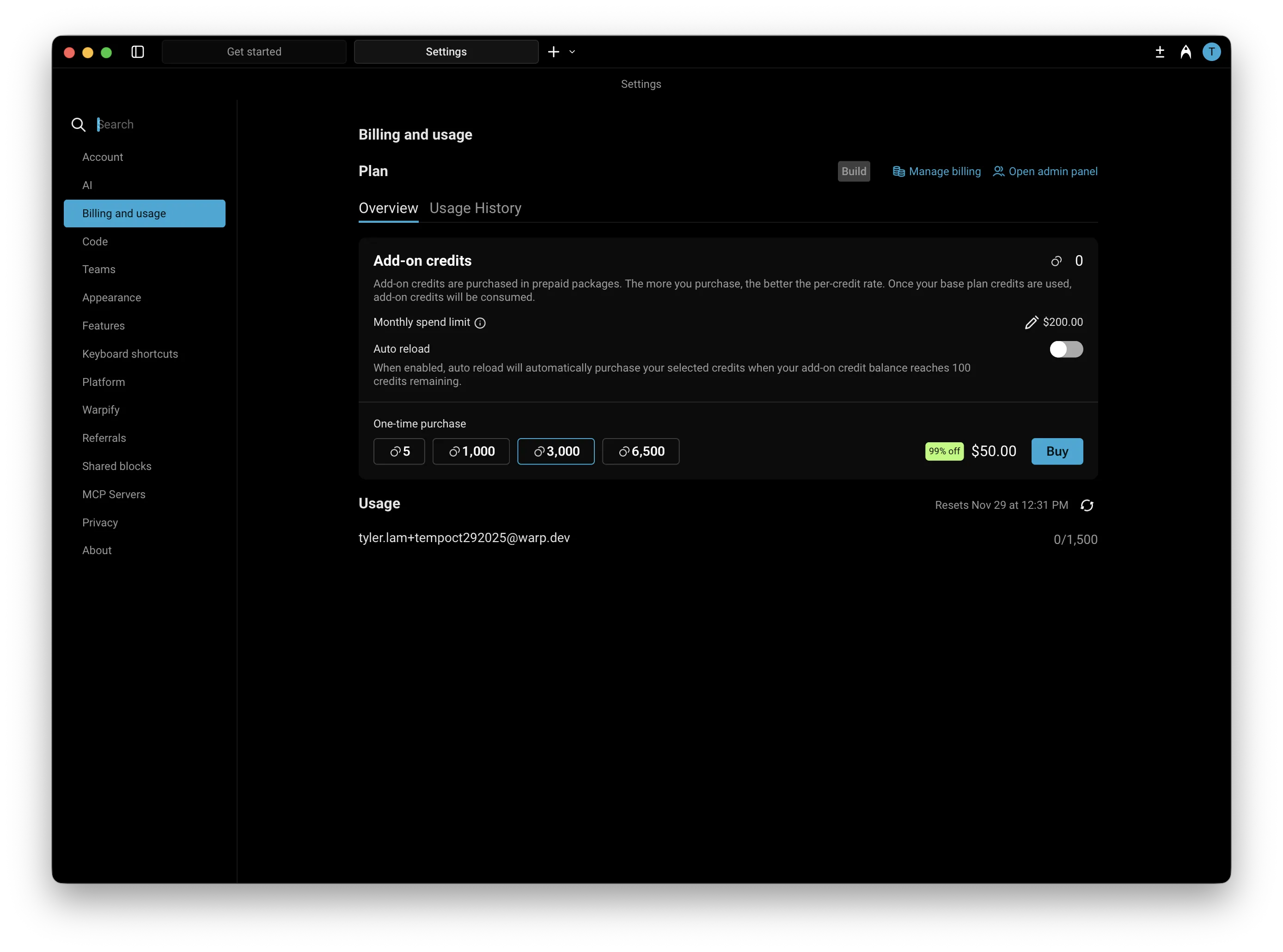
You can manage and purchase add-on credits directly in Settings > Billing and usage.
How do add-on credits work?
Section titled “How do add-on credits work?”Add-on credits extend your AI usage beyond the included monthly quota in your plan. Once your plan’s credits are used up, Warp will automatically begin drawing from your available add-on credits.
If you’ve enabled auto-reload, new credits will be added automatically and billed based on your selected configuration of monthly spending limit and selected purchase amount.
Add-on credits are available for Build, Max, Business, and Enterprise plans (with custom pricing for Enterprise). On self-serve plans (Build, Max, and Business), add-on credits are scoped to each individual user; Enterprise uses a team-pooled model. These credits roll over across billing cycles and remain valid for 12 months from the purchase date.
Add-on credits draw from the same pool as platform credits and compute credits, so a single balance covers all three credit types.
Purchasing add-on credits
Section titled “Purchasing add-on credits”You have two options for purchasing more credits:
1. Buy on-demand
Section titled “1. Buy on-demand”You can purchase additional add-on credits at any time directly within the app under Settings > Billing and usage. Buying more credits upfront provides a larger discount.
The table below shows the available credit denominations, their prices, and corresponding discounts:
| Credits | Price (USD) | Price per Credit | Discount |
|---|---|---|---|
| 400 | $10 | $0.025 | Base rate |
| 1,000 | $20 | $0.020 | 20% off |
| 3,000 | $50 | $0.016 | ~35% off |
| 6,500 | $100 | $0.0153 | ~40% off |
2. Enable auto-reload
Section titled “2. Enable auto-reload”Auto-reload automatically purchases more credits whenever your balance reaches 100 credits, ensuring uninterrupted access to premium AI features.
By default, auto-reload is disabled for new subscribers. When you turn it on, it starts with a $200 monthly spend limit, which you can adjust anytime in Settings > Billing and usage.
Auto-reload uses the same denominations and discounts as manual purchases. The denomination you select (e.g., 400, 1,000, 3,000, or 6,500 credits) will repeat each time your balance is depleted, up to your monthly spending limit. Larger denominations offer up to ~40% off per credit.
Configuring a monthly spend limit
Section titled “Configuring a monthly spend limit”Your monthly spend limit sets the maximum amount you can spend on add-on credits in a single calendar month. This ensures you have full control over your AI usage costs while still allowing flexibility for automatic top-ups when needed, keeping your workflow uninterrupted.
- The default limit is $200, but you can increase or decrease it anytime in Settings > Billing and usage.
- If a credit purchase would exceed your limit, it won’t process — you’ll need to either raise your limit or choose a smaller add-on credit amount.
- Once your limit is reached, no additional add-on credit purchases (manual or automatic) will occur until:
- The next calendar month begins, or
- You update your limit in settings.
Billing and credit usage
Section titled “Billing and credit usage”When your monthly credit balance renews:
- Warp first consumes your included monthly credits (e.g., Build plan credits).
- After those are used, Warp continues to draw from any available add-on credits.
- If your add-on credits run out and auto-reload is enabled, Warp will automatically purchase more up to your monthly limit.
You can track your remaining credits and spending in the credits transparency footer and in Settings > Billing and usage.
Teams using add-on credits
Section titled “Teams using add-on credits”On Build, Max, and Business self-serve plans, add-on credits are scoped to individual users. Each team member’s add-on credits draw down only for their own usage.
Team admins manage add-on credit settings for the team in Settings > Billing and usage:
- Team-wide spend cap — Sets the maximum amount the team can spend on add-on credits per calendar month, applied across all members.
- Auto-reload — When enabled, the admin selects an add-on credit denomination for the team. Warp automatically purchases that denomination for any user whose add-on credit balance drops below 100 credits, subject to the team-wide spend cap. While auto-reload is on, individual users cannot purchase add-on credits manually.
- Manual purchases — When auto-reload is off, eligible team members can purchase add-on credits for themselves, as long as the team stays below the team-wide spend cap.
For how cloud agent runs that aren’t initiated by a specific team member (scheduled runs, agent API key runs) are billed, see How are cloud agent runs on team plans billed when no individual user triggered them? in the Pricing FAQs.
Plan changes and cancellations
Section titled “Plan changes and cancellations”Any purchased add-on credits remain in your account and can continue to be used for up to 12 months after purchase, as long as you have an active subscription.
If you move to the Free plan, your remaining add-on credits aren’t removed. They keep their original 12-month expiration from the purchase date, but you can’t use them. When you re-subscribe, on the same team, you regain access to any unused, non-expired credits. You also can’t buy additional add-on credits until you’re subscribed again.
When team membership changes
Section titled “When team membership changes”Add-on credits are tied to the team they were purchased under. The flows below describe what happens in common team-membership scenarios:
- A user leaves a team - You lose access to any add-on credits tied to that team. If you rejoin the same team later, you regain access to any unused, non-expired credits. The admin pays a prorated rate for your seat on rejoin.
- An admin removes a member - That member loses access to any add-on credits tied to the team. If they rejoin later, they regain access to any unused, non-expired credits.
- An admin deletes the team - Any remaining add-on credits must be used or removed before a team can be deleted. Contact support@warp.dev if you need help with this.